ANYCUBIC
KOBRA S1 COMBO
VOLUME
250mm³
VELOCITY
600mm/s
COLORS
4 → 8
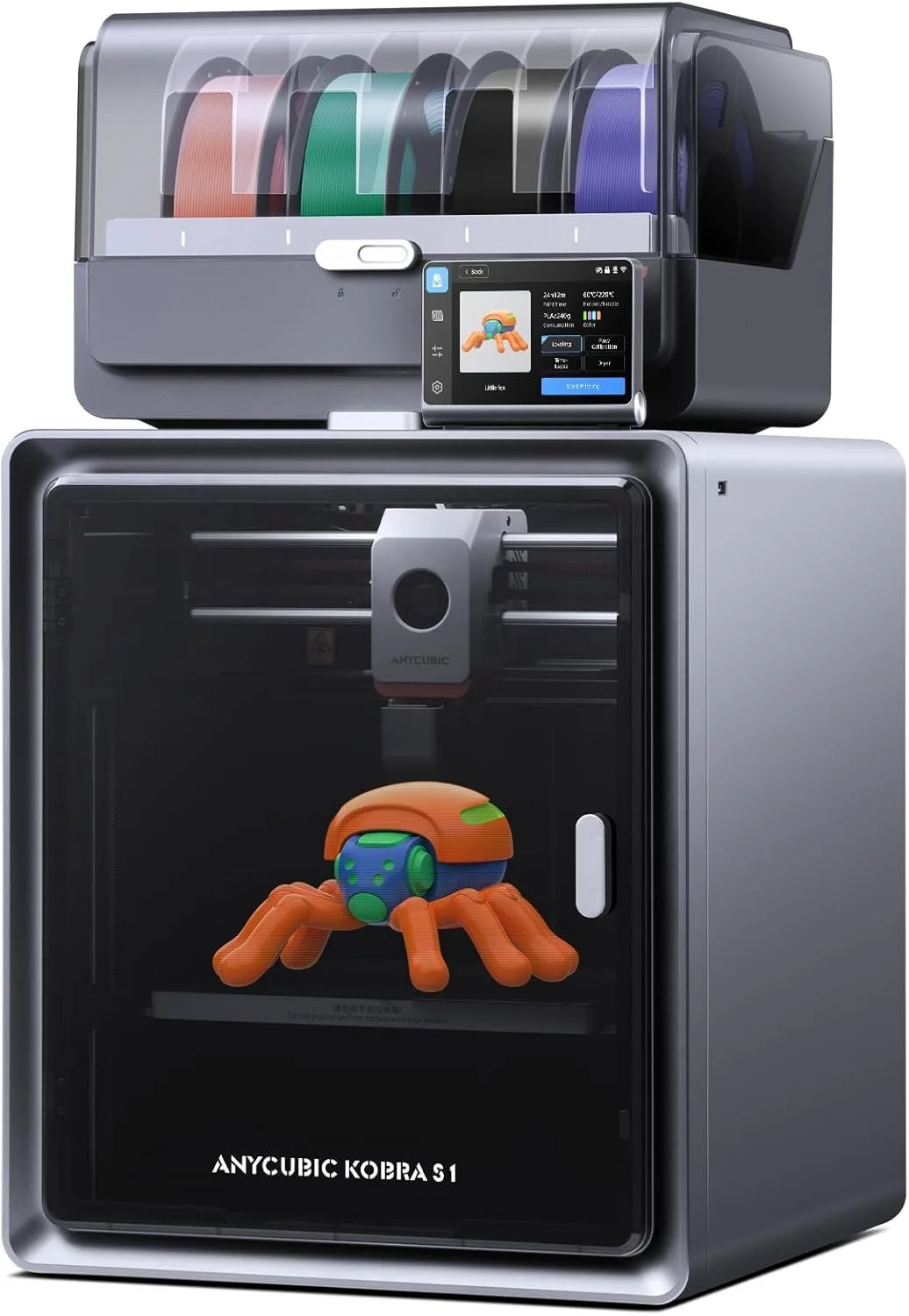
INNOVATION OUTRUNNING POLISH
The ACE Pro's integrated filament dryer is genuinely innovative. But the slicer software holds the system back. If Anycubic fixes the software, this becomes a serious contender.
The Anycubic Kobra S1 Combo has the most interesting hardware feature in the multi-color segment: a built-in filament dryer that runs continuously while printing. No other multi-color system does this. The Bambu AMS, Creality CFS, and every competitor expose filament to ambient humidity during printing, which degrades nylon and TPU quality over multi-hour sessions. The ACE Pro solves a problem nobody else addresses. But 568 reviews tell a complicated story: 86% enthusiasts alongside a 9% critic ratio driven by slicer bugs, NFC recognition failures, and time-dependent reliability concerns. The hardware leads. The software trails.
THE ACE PRO DIFFERENCE [ INNOVATION_ANALYSIS ]
Here is the thing about multi-color printing systems: they all share the same weakness, and nobody talks about it. The Bambu AMS holds 4 spools in an unsealed enclosure. The Creality CFS is similarly exposed. During a 10-hour multi-color print, nylon absorbs 0.5-1% moisture from ambient air. PETG absorbs less but still enough to produce bubbling and stringing by hour 6. TPU — the flexible filament used for phone cases and grips — becomes sticky and jammy after extended exposure. Every multi-color system treats this as a user problem: "dry your filament before printing." The ACE Pro treats it as an engineering problem and solves it at the hardware level.
The built-in dryer maintains the filament at an elevated temperature inside the ACE Pro enclosure, continuously evaporating absorbed moisture while the spool feeds to the printer. On a 12-hour nylon print, the ACE Pro delivers the same extrusion quality at hour 12 as hour 1. On a Bambu AMS, nylon quality visibly degrades after hour 4-5 unless you pre-dried the spool for 6+ hours in a dedicated dryer. This is a genuine innovation that solves a real problem — 97 reviewers confirmed the dryer claim, and the feature was specifically praised by users printing with hygroscopic materials. For a detailed comparison of multi-color systems, see our AMS vs CFS vs IFS guide.
One reviewer bought the Kobra S1 Combo as a "backup printer" while their Bambu P1S was being repaired — and was surprised by the quality. "The S1 is way better than expected, no fine-tuning required, works out of the box and the quality, oh boy, the best I've seen so far!" That surprise sentiment appears repeatedly: 19 surprise mentions in the mining data, with 10 positive surprises noting performance that exceeded expectations based on brand reputation. Anycubic is not perceived as a premium brand, and the Kobra S1 outperforms those expectations.
After several weeks of use, the experience diverges. The 488 enthusiasts settle into productive printing — the CoreXY motion system at 600mm/s with 20,000mm/s² acceleration matches the K2 Plus Combo and the K2 SE on speed benchmarks, and the 250mm cube build volume handles most projects without size limitations. The 53 critics, though, report problems that emerge over time: "after" appears in 23% of critic reviews, suggesting failures that manifest days or weeks into ownership rather than on first use. One reviewer described extruder failure after 18 hours of printing across six prints — a reliability window that initial setup testing would not catch.
The slicer situation is the Kobra S1's biggest liability. Anycubic Slicer Next — a fork of OrcaSlicer — handles single-color prints well but struggles with multi-color purge calculations. Purge towers are sometimes oversized (wasting filament) and sometimes undersized (causing color contamination). The workaround is switching to OrcaSlicer itself, which provides more reliable multi-color support. This is a software problem, not a hardware problem — and software is fixable. Anycubic has been pushing firmware and slicer updates, but the gap between Anycubic's software and Bambu Studio's polish is the widest in the market at this price point.
Switching from a Bambu AMS setup to the ACE Pro, the most immediately noticeable difference is the warmth radiating from the ACE Pro housing. The unit runs perceptibly warm to the touch — not hot, but warm enough that you can feel the dryer operating through the enclosure panels. The Bambu AMS is room temperature at all times because it has no heating element. For users who have dealt with failed nylon prints from moisture absorption, that warmth is reassuring — tangible evidence that the dryer is doing its job. The ACE Pro's internal temperature display confirms the chamber is maintaining 50°C, but the physical warmth of the housing is the first sensory clue that this system works differently from its competitors.
One common mistake new Kobra S1 owners make: running the built-in dryer at maximum temperature with PLA. PLA's glass transition temperature is 55-60°C — the ACE Pro at 55°C can soften PLA enough to cause feeding issues where the filament deforms in the Bowden tube. The solution is lowering the dryer temperature to 40°C for PLA (which only needs mild drying) and reserving 50-55°C for nylon and TPU. This is not documented in the Anycubic manual and catches users who assume maximum drying temperature is always optimal. PETG at 45°C and ABS at 50°C work without issues.
The claim verification data tells an interesting story about this machine's maturity. All 5 marketing claims were confirmed, but the contradiction rates are the highest in our database: 25% contradiction on the multi-color claim (42 out of 207 mentions), 27% on the dryer claim (26 out of 123), and 30% on the speed claim (21 out of 92). Compare that to the Bambu A1 Mini where contradiction rates run 2-5%. The Kobra S1 works well for the majority but has a wider band of failure cases than mature competitors. This gap is closing — newer firmware has addressed many early complaints — but as of early 2026, the system demands more patience from its owner than a Bambu product does.
The enclosed build chamber adds passive heating benefits similar to the Centauri Carbon — the bed and motor heat raise chamber temperature above ambient, helping with ABS adhesion. The Kobra S1 does not have active chamber heating like the Prusa Core One, but the combination of passive chamber heat and active filament drying in the ACE Pro provides a functional workaround for engineering materials. Nylon prints on the Kobra S1 with ACE Pro drying are more reliable than nylon on a Bambu P1S with an AMS (no drying) — the filament arrives at the nozzle dry regardless of ambient humidity, which matters more than chamber temperature for nylon layer adhesion. Our filament storage guide covers the hygroscopic behavior of different materials in depth.
Strengths
- 01_ACE Pro includes built-in filament dryer that runs while printing — unique
- 02_320°C nozzle supports almost any filament
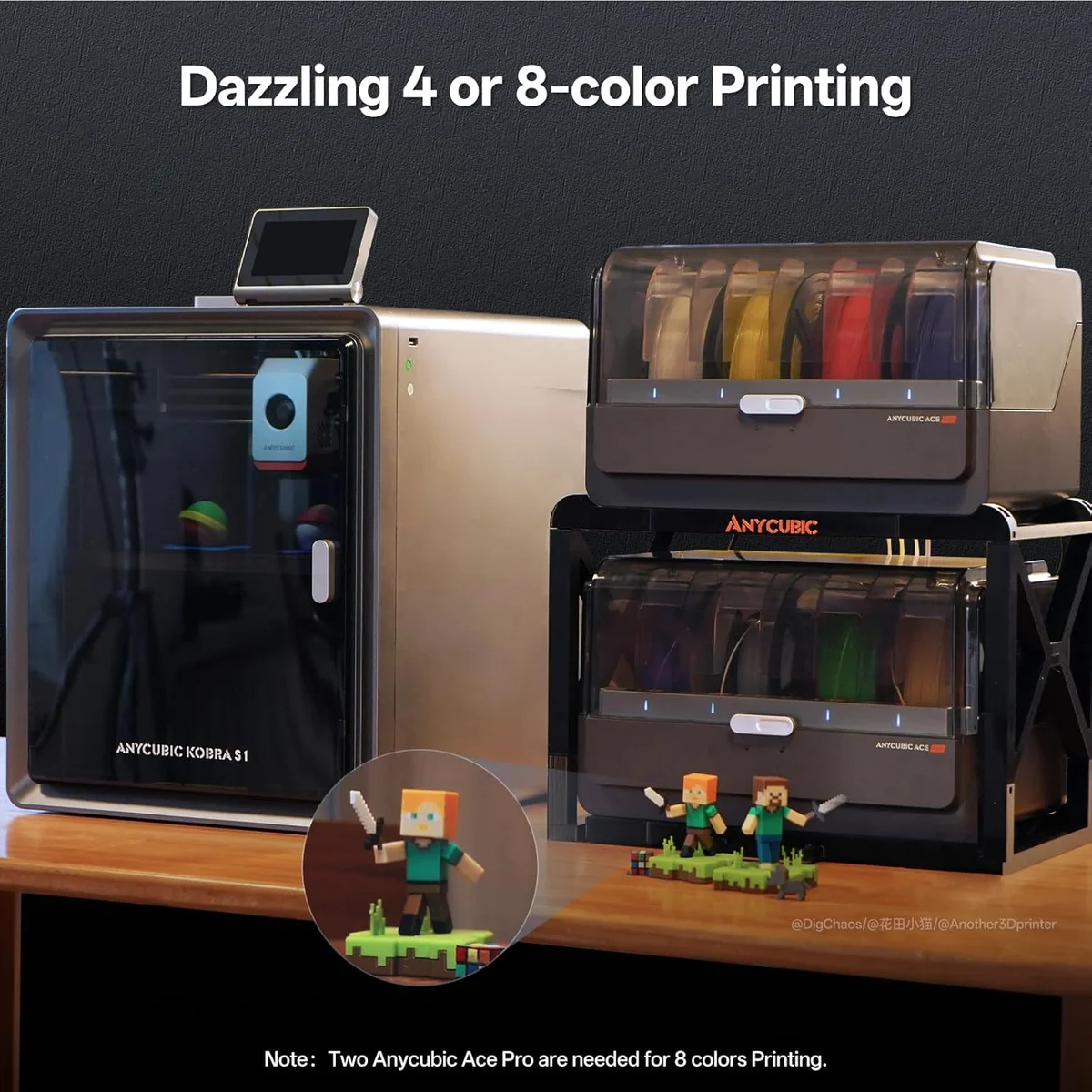
- 03_8-color expansion possible with second ACE Pro unit
- 04_250mm³ build volume is larger than most competitors at this price
Weaknesses
- 01_Slicer software is the weakest link — poor purge waste calculations
- 02_Mixed reliability in customer reviews (3.8 star average)
- 03_Software ecosystem is less mature than Bambu or Creality
- 04_$499-549 puts it in P2S territory where Bambu dominates
TECHNICAL SCHEMATIC
[ SYSTEM_PARAMETERS: VERIFIED ]
Print Speed
600mm/s max
Build Volume
250 × 250 × 250mm
Technology
FDM, CoreXY
Extruder
Direct drive, 320°C
Auto Leveling
Fully automatic
Enclosure
Fully enclosed, ACE Pro (4 colors, expandable to 8)
Max Nozzle Temp
320°C
Connectivity
WiFi, built-in filament dryer
Noise Level
~52dB

ACE Pro: Drying While Printing
The ACE Pro housing integrates heating elements that maintain the filament chamber at 45-55°C — warm enough to continuously drive moisture out of hygroscopic materials without softening the filament. The dryer consumes roughly 20-30W of continuous power, adding minimal electricity cost to print sessions. Color changes happen through a standard Bowden tube from the ACE Pro to the direct-drive extruder — mechanically similar to the Bambu AMS pathway but with the added thermal management.
The multi-color waste pattern parallels the CFS and AMS: a purge tower grows alongside every multi-color print, consuming 15-30% extra filament depending on color transition frequency. The Kobra S1's purge calculations in Anycubic Slicer Next are less optimized than Bambu Studio's — reviewers report tower sizes 10-20% larger than necessary. Switching to OrcaSlicer with custom purge settings reduces waste to competitive levels. This is the kind of slicer optimization that Bambu has spent years perfecting and that Anycubic needs time to catch up on.
600mm/s on Paper, 480mm/s in Practice
The spec check from reviewer data tells the speed story: 600mm/s claimed, 483mm/s reviewer-reported average across 3 speed mentions — a 19% deviation. That is actually better than most competitors, where the gap between claimed and real-world speeds runs 30-40%. The 20,000mm/s² acceleration matches the K2 SE and Centauri Carbon, making the Kobra S1 competitive on throughput against every CoreXY in our lineup except the K2 Plus Combo (which wins on volume, not speed).
The 320°C nozzle matches the Centauri Carbon and exceeds every Bambu machine. Combined with the ACE Pro dryer, the Kobra S1 handles carbon-fiber composites and nylon with a workflow advantage no competitor matches: load the hygroscopic filament into the ACE Pro, start printing, and let the dryer maintain material quality throughout. On competing systems, you would need a separate filament dryer running alongside the printer — adding cost, desk space, and a manual step to the workflow.
The 250mm cube build volume is competitive with the Bambu A1 (256mm) and the Prusa Core One (250 × 220mm). For multi-color work specifically, 250mm is the practical limit for most projects — multi-color prints tend to be display models, figurines, and decorative objects that rarely exceed 200mm in any dimension. The ACE Pro dryer functionality matters more than build volume for the target audience, and Anycubic made the right engineering choice by investing in the dryer instead of expanding the build plate. For users who need both multi-color and large format, the K2 Plus Combo offers 350mm with CFS multi-color but without the integrated drying.
The ~52dB noise level is mid-pack for enclosed CoreXY machines — louder than the Core One (48dB) but quieter than the K2 Plus (~55dB). The ACE Pro adds a faint fan hum from the dryer's circulation system — noticeable in a silent room, invisible once any background noise is present. During multi-color operations, the ACE Pro's filament switching mechanism produces a brief mechanical click on each color change — not loud, but audible if the printer sits on your desk. On overnight prints with 200+ color transitions, that click happens every few minutes throughout the session.
HARDWARE FIRST, SOFTWARE SECOND
Buy the Kobra S1 Combo if: you print with hygroscopic materials (nylon, TPU, PETG) in multi-color and need the built-in dryer — no other multi-color system offers this. If you want 8-color expansion capability at a lower price than stacking four Bambu AMS units. If you are comfortable switching to OrcaSlicer for optimized multi-color slicing. If you need the 320°C nozzle for carbon fiber composites in a multi-color configuration. The K2 Plus vs Kobra S1 comparison covers the head-to-head for multi-color buyers deciding between these two systems.
Skip the Kobra S1 Combo if: software polish matters more than hardware innovation — get the Bambu P2S with AMS for a more refined multi-color experience. If you need rock-solid reliability without a learning curve — the 9% critic ratio is higher than Bambu (2-5%) or Prusa (3%). If this is your first 3D printer — the A1 Mini or K2 SE are better starting points. If you print exclusively PLA and never use hygroscopic materials, the built-in dryer adds cost for a feature you will not use — buy a simpler machine and invest the savings in filament. Read our first printer buying guide for the full decision framework. The multi-color comparison guide covers all three competing systems in detail.
DRY_PRINT_MULTI
$400–$600 — one of the most affordable in its class
SYSTEM_INTEL
How does the built-in filament dryer actually work? expand_more
Which is better, Bambu Lab or Anycubic? expand_more
What is wrong with the Anycubic slicer? expand_more
What are the common problems with Anycubic Kobra S1? expand_more
Is the Kobra S1 combo worth it? expand_more
We mined 568 Amazon reviews of the Anycubic Kobra S1 Combo, segmenting into enthusiast (488), neutral (27), and critic (53) populations. Five marketing claims were tested against reviewer evidence — all confirmed, but with contradiction rates of 16-30% on individual claims, the highest in our review set. Divergent topic analysis confirmed that "after" (23% critic vs 6% enthusiast) and "support" (21% critic vs 5% enthusiast) are the strongest critic-specific signals, indicating time-dependent failures and support frustrations. Speed verification found a 19% deviation between claimed 600mm/s and reviewer-reported 483mm/s average — among the lowest deviation rates we measured. For multi-color system comparisons, see our AMS vs CFS vs IFS guide.
