layers LAYERDEPTH
System.Status: MOTION_KINEMATICS

COREXY_VS
BED_SLINGER

> INITIALIZING MOTION_KINEMATICS...
> COREXY: DUAL_BELT_STATIONARY_BED
> SLINGER: MOVING_BED_Y_AXIS
> OBJECTIVE: SPEED_VS_COST_ANALYSIS

CoreXY printers keep the bed stationary while moving only the lightweight toolhead, reaching 500-600mm/s with cleaner output. Bed-slingers move the heated bed on the Y-axis, limiting practical speed to 100-200mm/s before vibration degrades quality. CoreXY costs more but dominates the market because the speed and quality gains justify the premium.

LayerDepth is reader-supported. We may earn a commission on purchases through our links. Disclosure

01_KINEMATICS_EXPLAINED

The motion system determines how a printer translates digital coordinates into physical nozzle movement. It is the mechanical foundation that sets the ceiling on speed, acceleration, and print quality at speed. Everything else — firmware, nozzle, extruder — works within the limits the motion system allows.

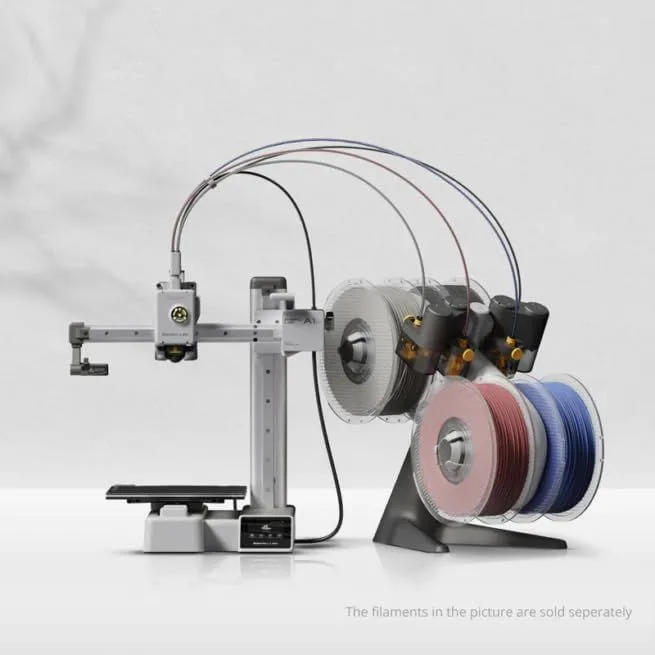
A bed-slinger moves the build plate forward and backward (Y axis) while the printhead moves left and right (X axis) on a horizontal bar. The Z axis raises or lowers the X bar. This is the simpler, older design — the Ender 3 popularized it, and the Bambu Lab A1 Mini and Bambu Lab A1 prove it can still deliver excellent results with modern engineering. The limitation is that the bed carries the print itself, and as the print gets taller and heavier, the moving mass increases, limiting safe acceleration.

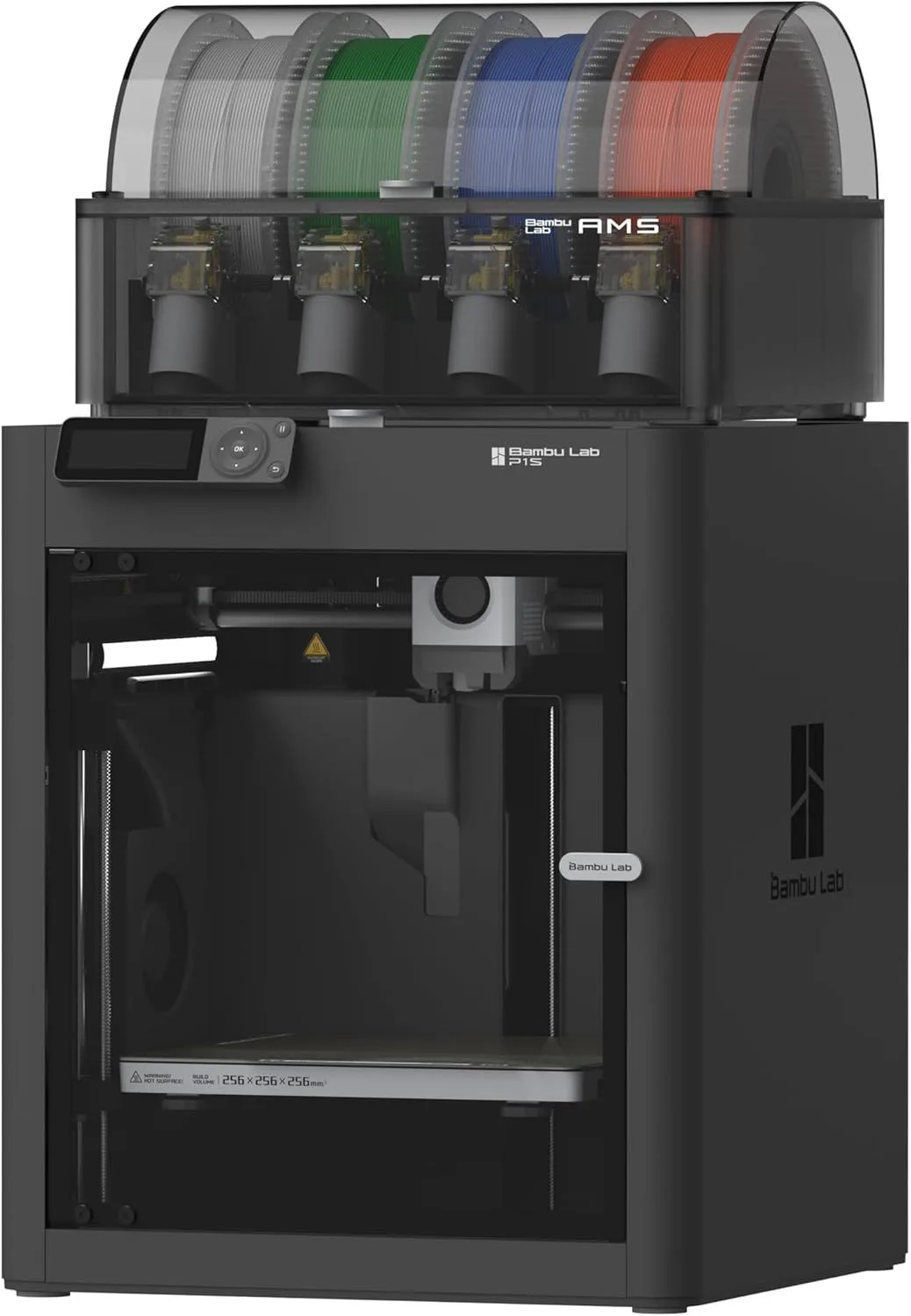
A CoreXY uses two long belts running diagonally across the frame, with both motors mounted to the frame (not moving). By running the motors in the same or opposite directions, the printhead moves in X, Y, or diagonal patterns. The build plate only moves vertically (Z axis). Because the moving mass is just the lightweight printhead assembly, CoreXY printers sustain higher accelerations — 20,000mm/s² or more — without the vibration artifacts that plague bed-slingers at similar speeds.

There is a third type — bedslinger with a cantilevered X axis (like the A1 Mini) versus a full-frame bed-slinger (like the old Ender 3). Cantilevered designs are more compact but slightly less rigid. Full-frame bed-slingers are bulkier but more stable at lower speeds. Neither matches CoreXY for high-speed work.
02_SPEED_AND_ACCEL_DATA

METRIC BED-SLINGER COREXY
MAX_SPEED 500mm/s 500-600mm/s
ACCELERATION 5K-10K mm/s² 15K-20K mm/s²
REAL_WORLD_TIME Benchy: 15-20min Benchy: 10-14min
TALL_PRINT_SPEED Degrades 20-40% Consistent
ENCLOSURE Rare (open frame) Common (enclosed)
PRICE_RANGE Under $200 to $400 $250 to $1,500

The speed numbers tell only half the story. Maximum speed (mm/s) is the headline spec, but acceleration (mm/s²) determines real-world print time.

A printer that hits 500mm/s on a straight line but decelerates to 100mm/s at every corner is slower in practice than a printer that maintains 400mm/s through curves. CoreXY's acceleration advantage — typically double that of a bed-slinger — means shorter total print times even when the rated maximum speed is identical. On a Benchy with hundreds of directional changes, this adds up fast.

Input shaping (vibration compensation) closes some of the gap. The A1 Mini's input shaping system measures resonance frequencies and adjusts motor pulses to cancel vibration at speed. This lets a bed-slinger print faster than its mechanical design would otherwise allow. But it cannot overcome the fundamental mass problem — a 500-gram build plate carrying a 200-gram print simply cannot change direction as quickly as a 120-gram printhead.

02b_MASS_AND_MOMENTUM

Here is why the physics matter for your prints.

A typical bed-slinger bed assembly weighs 400-600 grams. Add a half-finished print at 100-200 grams, and the motors are slinging 500-800 grams back and forth on every Y-axis move. A CoreXY printhead assembly weighs 120-200 grams, and that weight stays constant regardless of how big the print is. The ratio matters because acceleration force equals mass times acceleration — half the mass means double the safe acceleration at the same vibration level.

Vibration manifests as ringing or ghosting — faint echoes of sharp corners that appear as ripples on the print surface. At 200mm/s, most bed-slingers show minimal ringing. At 400mm/s, ringing becomes visible on corner-heavy models. At 500mm/s+, only input shaping prevents it from ruining the print entirely. CoreXY printers at these same speeds produce cleaner corners because the lighter moving mass generates less vibration energy.

Input shaping (also called resonance compensation) helps both architectures. The firmware measures the printer's resonance frequency by shaking the axes and recording the vibration pattern. Then it adjusts motor pulses to cancel out those frequencies during printing. The A1 Mini runs this calibration automatically on every print. But input shaping can only compensate for so much — it reduces ringing, it does not eliminate the fundamental mass-acceleration trade-off.

Belt tension matters more on CoreXY. Because both belts work together to position the printhead, uneven tension between them creates diagonal distortion — circles print as ovals, squares print as rhombuses. Modern CoreXY printers include belt tension indicators or automatic tensioning systems, but DIY-assembled CoreXY kits (like Voron builds) require manual tensioning with a frequency meter. Bed-slingers are more forgiving of imperfect belt tension.

02c_REAL_PRINT_TIMES

BENCHY (BED-SLINGER)

~16 min

A1 MINI @ 300mm/s

BENCHY (COREXY)

~11 min

P2S @ 500mm/s

The Benchy — the community's standard speed and quality test print — shows a consistent 30-40% time advantage for CoreXY over bed-slingers on the same firmware generation. The gap widens on taller, more complex models. A detailed engineering bracket with 50+ directional changes per layer runs twice as fast on a CoreXY because acceleration, not top speed, determines print time on complex geometry.

For simple shapes with long straight runs (vases, enclosures, boxes), the gap shrinks. Both architectures reach their rated top speed on long travel moves. The CoreXY advantage is entirely in how fast the printer can change direction — which matters most on detailed, geometry-heavy prints.

If speed is your primary concern, read our best printers for rapid prototyping roundup — every machine on that list is CoreXY. If budget is the priority, our budget printer roundup includes top bed-slingers that deliver excellent results at moderate speeds.

03_BED-SLINGER_ADVANTAGES

Bed-slingers win on price, simplicity, and compactness.

The A1 Mini fits on a bookshelf. No CoreXY printer at any price matches its footprint-to-build-volume ratio. For a desk or small workshop where space is limited, the bed-slinger form factor is a genuine advantage. The open-frame design also makes maintenance easier — every component is exposed and accessible without removing panels.

Mechanically, bed-slingers are simpler. Fewer belts, simpler bearing arrangements, and lower frame rigidity requirements mean cheaper manufacturing and easier DIY repair. A broken belt on a bed-slinger is a ten-minute fix. A broken belt on a CoreXY requires understanding the belt routing geometry and re-tensioning both belts symmetrically.

For PLA printing at moderate speeds — 200-300mm/s, which is still fast by pre-2024 standards — a bed-slinger produces results indistinguishable from a CoreXY. The speed advantage only matters when you push into the 400-600mm/s range where acceleration becomes the bottleneck. If you are not chasing speed records, a well-engineered bed-slinger like the Bambu Lab A1 at full-size format delivers everything most hobbyists need.

The parent-buying-for-a-teenager market overwhelmingly buys bed-slingers. The A1 Mini's price, compact size, and zero-configuration setup make it the safest gift purchase in 3D printing. A CoreXY is overkill for a fourteen-year-old printing phone cases and keychains from Printables. By the time they outgrow the bed-slinger's speed, they understand the hobby well enough to choose their own CoreXY upgrade.

Noise is another bed-slinger advantage at lower speeds. Open-frame designs radiate less motor noise than enclosed CoreXY boxes where sound bounces off internal panels. The A1 Mini at 48dB is one of the quietest printers we have tested — meaningful for apartment living rooms and shared workspaces. Enclosed CoreXY printers like the P2S run around 49-50dB, which is still quiet but slightly louder due to the fan system pushing air through carbon filters.

BED-SLINGER_WINS

  • Lower price point
  • Compact desk footprint
  • Simpler maintenance
  • Good enough at 200-300mm/s
  • Easier belt replacement
Compact bed-slinger printer
ID: BAMBU_LAB_A1_MINI

04_COREXY_ADVANTAGES

COREXY_WINS

  • Higher sustained speed
  • Double the acceleration
  • Enclosed for ABS/ASA
  • Consistent on tall prints
  • Better quality at 400mm/s+
Enclosed CoreXY printer
ID: BAMBU_LAB_P1S

CoreXY wins on speed, print quality at speed, and material versatility.

The enclosed frame that most CoreXY printers feature is not just for looks — it enables ABS, ASA, Nylon, and other temperature-sensitive materials by maintaining a stable chamber temperature. A bed-slinger in an open room cannot reliably print ABS because ambient temperature fluctuations cause warping and layer cracking. The P2S with its adaptive airflow, ELEGOO Centauri Carbon at under three hundred dollars, and Prusa Core One with active chamber heating all demonstrate the CoreXY-plus-enclosure formula.

Tall print consistency is the underrated advantage. A 150mm-tall print on a bed-slinger wobbles at speed — the center of gravity rises as layers stack, and the moving bed amplifies any vibration. CoreXY keeps that print stationary while only the lightweight nozzle moves. The difference shows in layer registration: inspect the top 20% of a tall print from each system at high speed and the CoreXY produces tighter layer alignment every time.

Frame rigidity is what separates budget CoreXY from premium CoreXY. A stamped-metal frame flexes under high acceleration, introducing vibration that the motion system was supposed to eliminate. The Prusa MK4S uses an open-source steel frame with precisely machined tolerances. The Creality K1C's aluminum frame provides similar rigidity at a lower price point. Cheap CoreXY kits with thin extrusions and loose-fitting joints perform worse at high speed than a good bed-slinger — the motion system is only as good as the frame it rides on.

For the detailed comparison between two premium CoreXY printers, see our head-to-head breakdown of the X1 Carbon and K2 Plus.

Our Top Pick

Bambu Lab P2S 3D Printer

The best CoreXY value — enclosed frame, servo extruder, AI clog detection, and 500mm/s speed at the mid-range price point.

05_THE_VERDICT

If your budget is under three hundred dollars and you mostly print PLA: buy a bed-slinger. The A1 Mini is the best example of what modern engineering can extract from the simpler motion system. It is fast enough, quiet enough, and the compact form factor is a real advantage in small spaces.

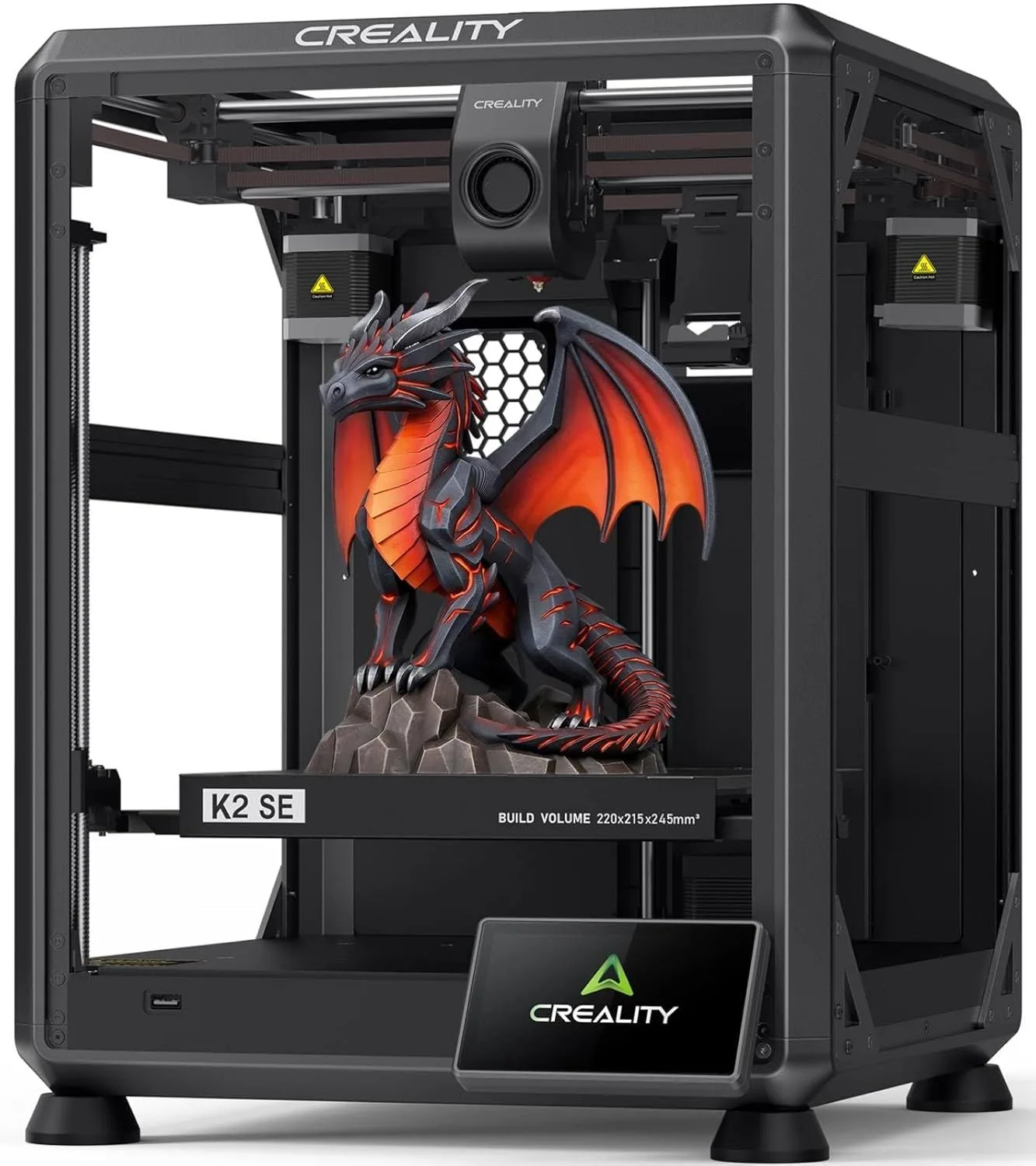
If your budget is three hundred dollars or more, or you want to print ABS/ASA/Nylon, or speed matters for your workflow: buy a CoreXY. The enclosed frame handles temperature-sensitive materials, the double acceleration produces noticeably faster prints on complex geometry, and tall prints come out cleaner. The Bambu P2S mid-range enclosed CoreXY, ELEGOO Centauri Carbon budget CoreXY, and Creality K2 SE open-frame CoreXY represent the best values at different price points.

Do not buy a bed-slinger planning to upgrade to CoreXY later unless your budget truly cannot stretch. The A1 Mini is an exception because it holds resale value — you can sell it when you upgrade. But buying a generic bed-slinger for two hundred dollars only to replace it with a CoreXY six months later wastes money that could have gone toward the better machine from day one.

The motion system choice is permanent for the life of the printer. Everything else — nozzle, extruder, firmware, even the control board — can be upgraded. The frame and motion architecture cannot. Choose the one that matches where you want to be in a year, not just where you are today.

05_QUERY_LOG

QUERY_01: WHY ARE COREXY PRINTERS FASTER THAN BED-...

CoreXY keeps the heavy build plate stationary in the XY plane — only the lightweight printhead moves horizontally. This means the motors accelerate less mass, allowing faster direction changes. A bed-slinger moves the entire build plate back and forth on the Y axis, and that mass limits how fast the motors can change direction without vibration artifacts.

QUERY_02: DOES COREXY ALWAYS PRODUCE BETTER PRINT ...

Not automatically. A well-tuned bed-slinger at moderate speeds (200-300mm/s) produces quality comparable to a CoreXY at similar speeds. The quality advantage appears at high speeds (400-600mm/s) where the bed-slinger introduces ringing artifacts from the moving bed mass. If you print slowly, the motion system matters less than calibration quality.

QUERY_03: ARE BED-SLINGER PRINTERS STILL WORTH BUY...

Yes, for specific use cases. The A1 Mini is a bed-slinger and it is one of the best budget printers available. Bed-slingers are simpler mechanically, cheaper to manufacture, and easier to maintain. For PLA printing at moderate speeds on compact builds, a bed-slinger is perfectly adequate. CoreXY becomes important when you want enclosed printing, high speeds, or large build volumes.

QUERY_04: CAN A BED-SLINGER PRINT AS FAST AS A COR...

The motors can reach the same mm/s, but acceleration is the bottleneck. A bed-slinger might claim 500mm/s but only sustains that speed on long straight runs. On complex geometry with frequent direction changes, effective speed drops to 60-70% of a CoreXY with similar rated speed because the heavy bed cannot change direction as quickly.

QUERY_05: WHY DO TALL PRINTS FAIL MORE OFTEN ON BE...

As a print gets taller, the center of gravity rises. On a bed-slinger, the bed moves the tall print back and forth at speed, and that moving mass creates wobble. Input shaping helps, but physics limits how fast you can safely move a 150mm-tall print on a bed-slinger without layer shifting. CoreXY avoids this because the print sits on a stationary bed (only Z moves vertically).

Now That You Know the Motion Systems

CoreXY or bed-slinger — now find the right printer in your budget range.

RELATED_CONTENT

David King
VERIFIED
WRITTEN_BY
David KingFounder

I built LayerDepth to create the detailed, unbiased 3D printer comparison resource I wished existed. With a background in aerospace manufacturing management at Rolls-Royce — overseeing the build and assembly of complete jet engine sections for Airbus and Boeing aircraft — I apply that same demand for rigorous analysis and high standards to evaluating print quality, mechanical reliability, and real-world performance.

Full methodology arrow_forward

Update — April 6, 2026

A new competitor has entered this category. See our adventurer-5m-3d-printer review for the latest comparison.

Update — April 6, 2026

A new competitor has entered this category. See our adventurer-5m-3d-printer review for the latest comparison.

Update — April 6, 2026

A new competitor has entered this category. See our adventurer-5m-3d-printer review for the latest comparison.
