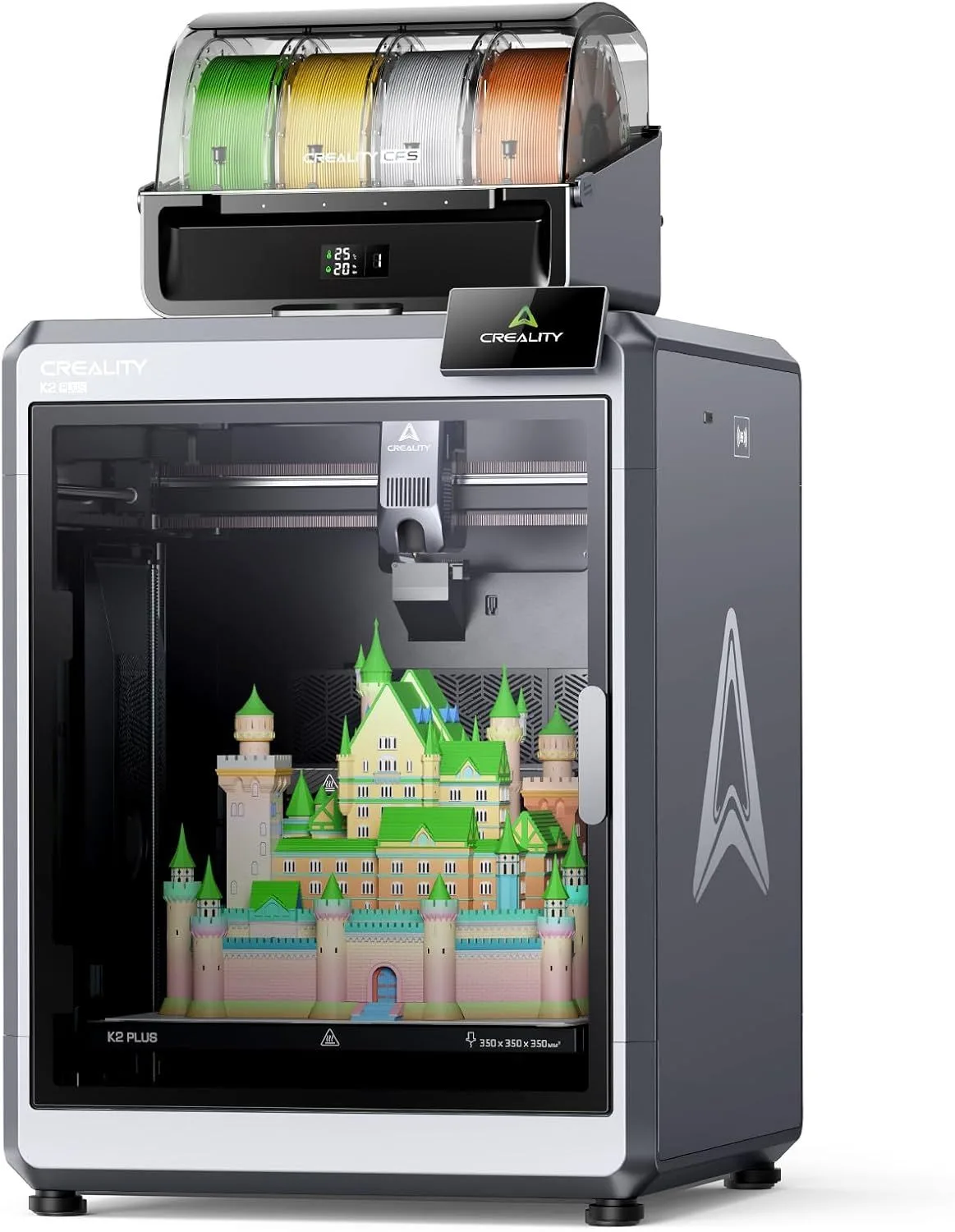
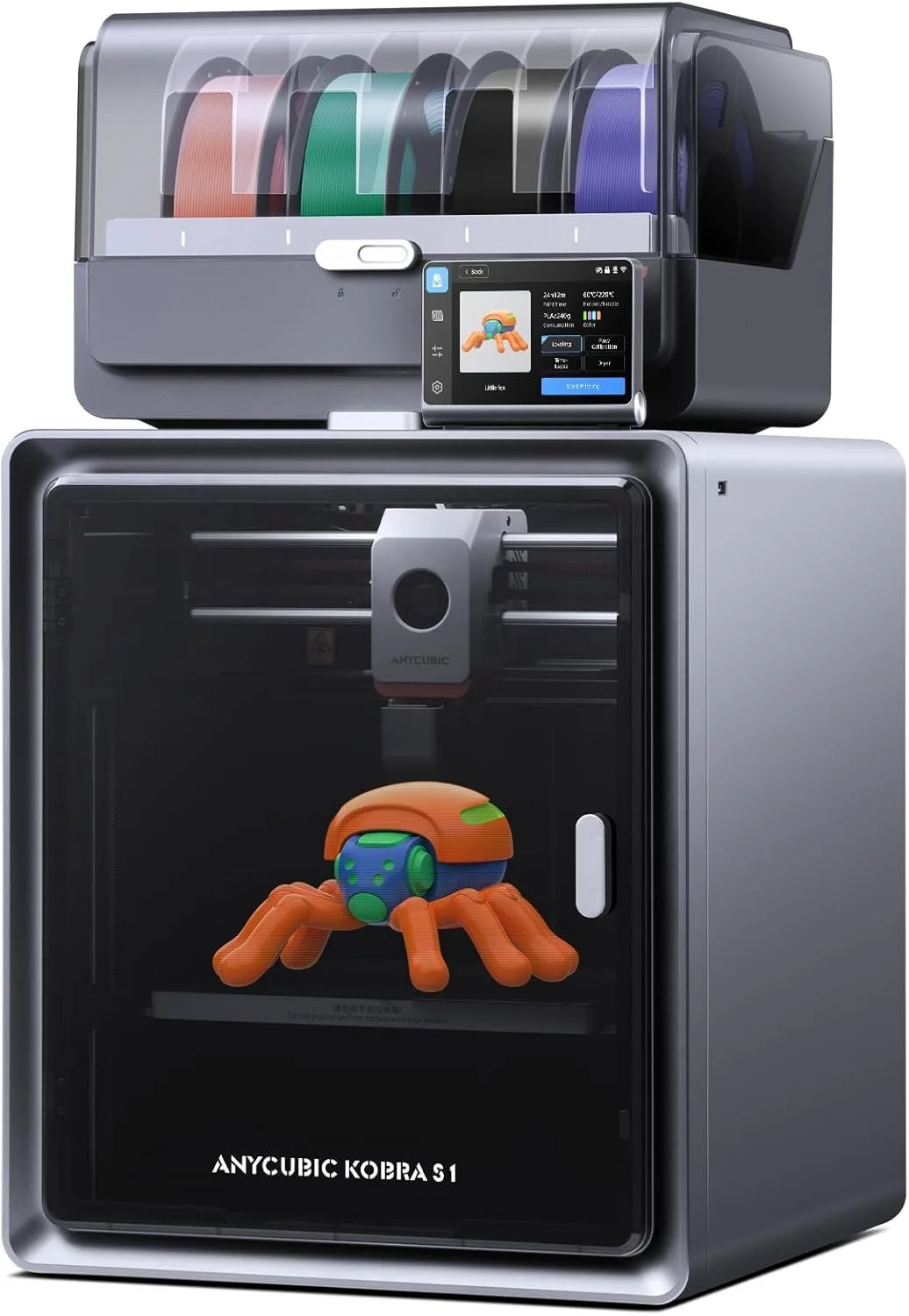
Creality K2 Plus Combo vs Anycubic Kobra S1 Combo
$1,000+
THE SHORT VERSION
Creality K2 Plus Combo
Nothing else combines 350mm build volume with 16-color CFS capability at this price tier. The K2 Plus is not a beginner machine — it demands real FDM experience and rewards that experience with production-scale multicolor output. The heated chamber handles ABS and nylon on prints that would not fit in any 256mm machine. Dual AI cameras monitor prints remotely. We recommend the K2 Plus for cosplay props, architectural models, and large-format prototyping. The cost is real — both purchase price and ongoing filament waste from CFS purge towers.
Anycubic Kobra S1 Combo
The ACE Pro's built-in filament dryer is the single most innovative feature in multi-color printing right now. It actively dries hygroscopic materials (nylon, PETG, PVA) during printing — eliminating the separate filament dryer that every other multi-color user needs. At roughly 40% of the K2 Plus price, the Kobra S1 delivers 4-8 color capability with 250mm build volume. The weak slicer software is the main compromise. The biggest difference between these two machines is scale versus innovation. For users who print moisture-sensitive materials regularly, the integrated dryer changes the daily workflow more than any spec-sheet advantage.
00_ SPEC_COMPARISON
[ MULTI-COLOR SHOOTOUT ]
| PARAMETER | K2_PLUS_COMBO | KOBRA_S1_COMBO |
|---|---|---|
| PRINT_SPEED | 600mm/s maxdrag_handle | 600mm/s maxdrag_handle |
| BUILD_VOLUME | 350 × 350 × 350mmcheck_circle | 250 × 250 × 250mm |
| MOTION_SYSTEM | FDM, CoreXYdrag_handle | FDM, CoreXYdrag_handle |
| MULTI_COLOR | Direct drive with CFS (4 colors, expandable to 16)check_circle | Direct drive, 320°C |
| ENCLOSURE | Fully enclosed, heated chambercheck_circle | Fully enclosed, ACE Pro (4 colors, expandable to 8) |
| NOZZLE_TEMP | 300°C | 320°Ccheck_circle |
| CONNECTIVITY | WiFi, dual AI cameras, Creality Printcheck_circle | WiFi, built-in filament dryer |
| NOISE_LEVEL | ~55dB | ~52dBcheck_circle |
4
K2 PLUS WINS
2
KOBRA S1 WINS
2
TIED
01_
BUILD VOLUME GAP
The volume difference here is not incremental. It is categorical, and it defines which projects each machine can physically handle.
The K2 Plus prints at 350 × 350 × 350mm — a 42.875-liter build envelope. The Kobra S1 prints at 250 × 250 × 250mm — a 15.625-liter envelope. The K2 Plus offers 2.7 times more usable space. That is the difference between printing a cosplay helmet in one piece versus splitting it into four sections with visible glue lines. Between prototyping a full-size product enclosure and prototyping a scale model.
For the types of objects that drive people to multi-color printers — cosplay armor with painted-on color regions, architectural models with material-coded zones, large display pieces with multi-color branding — the 350mm volume is what makes the K2 Plus irreplaceable in its niche. No other consumer enclosed printer matches this volume at this price. The closest competitor is the Bambu Lab X1 Carbon at 256mm, which costs a similar amount but gives up 94mm of build space in every axis.
The Kobra S1's 250mm cube is respectable. It handles most tabletop miniatures, mechanical parts, household items, and decorative objects. The volume only becomes a constraint on full-size wearable cosplay, large functional enclosures, and architectural models that need to be printed at 1:1 scale. If your multi-color projects fit within 250mm, the Kobra S1's smaller volume is not a limitation — and its lower purchase price leaves budget for filament.
One practical consideration: the K2 Plus's 350mm build volume demands dedicated desk space. The machine itself has a substantial footprint, and you need clearance around it for the CFS filament management unit. Apartment and home-office setups may find the K2 Plus physically too large for the available workspace. The Kobra S1's smaller frame fits more conventional desk arrangements without requiring a dedicated printing station.
42.9L
TOTAL VOLUME
15.6L
TOTAL VOLUME
02_
CFS VS ACE PRO
Both systems use filament switching through a Y-splitter into a single nozzle. Both produce purge waste during every color transition. Both add 15-30% to print time and filament usage on multi-color jobs. The core engineering is similar. The ecosystems and unique features around them are not.
The Creality CFS starts at 4 colors and expands to 16 through daisy-chaining additional units. Each unit holds 4 spools. The expansion path is the K2 Plus's strongest multi-color argument — 16 colors in a single print job opens creative possibilities that 4-color systems cannot touch. Gradient prints, full-color logos, multi-material functional parts with different shore hardness zones. The CFS handles filament runout detection and automatic relay switching between units.
The Anycubic ACE Pro also starts at 4 colors and expands to 8 with a second unit. The headline feature is the built-in filament dryer. Hygroscopic materials — nylon, PETG, PVA, and even standard PLA stored in humid environments — absorb moisture that causes bubbling, stringing, and weak layer adhesion during printing. Every serious multi-color user owns a separate filament dryer (typically $40-100). The ACE Pro eliminates that appliance by actively drying spools while they feed into the printer. For nylon and PVA (commonly used as soluble support material in multi-color prints), this is a workflow transformation that saves time, space, and frustration.
The slicer gap is where these two systems diverge most sharply in daily use. Creality Print handles CFS color assignment and purge volume calculation adequately — not as polished as Bambu Studio, but functional. The Anycubic slicer is the weakest of the three major multi-color platforms. Purge waste calculations are less accurate, leading to either color contamination (too little purge) or excessive waste (too much). Most Kobra S1 owners migrate to OrcaSlicer for multi-color work, which requires manual configuration of purge volumes and material compatibility settings. That configuration is not difficult for experienced users, but it is a barrier for newcomers to multi-color printing.
Both systems struggle with the same fundamental limitation: dissimilar material transitions. Switching between PLA colors produces clean transitions. Switching between PLA and TPU, or PLA and PVA, produces inconsistent results because the purge tower cannot fully clear one material before the next begins flowing. This limitation applies equally to CFS, ACE Pro, Bambu AMS, and every other single-nozzle multi-material system currently available. For detailed technical analysis, see our K2 Plus Combo review and the Kobra S1 Combo review.
CFS (CREALITY)
- + Expandable to 16 colors
- + Filament runout + relay switching
- + Adequate slicer integration
- − No built-in filament drying
- − CFS units add significant desk space
ACE PRO (ANYCUBIC)
- + Built-in filament dryer — unique
- + 320°C nozzle temp
- + Expandable to 8 colors
- − Weakest slicer of the three platforms
- − Less accurate purge calculations
03_
RELIABILITY & SOFTWARE
The review data tells a clear story. The K2 Plus holds a 4.2-star average across 890 reviews. The Kobra S1 sits at 3.8 stars across 1,200 reviews. That 0.4-star gap reflects a consistency difference that matters for a machine you run overnight.
K2 Plus reliability complaints concentrate in two areas: CFS purge waste quantity (a design characteristic, not a defect) and occasional color contamination on complex 4+ color jobs where the purge tower does not fully clear the previous color. Both issues are manageable through slicer settings — increasing purge volume at the cost of more filament waste. The mechanical hardware — die-cast frame, CoreXY motion, heated chamber — receives consistent praise for rigidity and dimensional stability even on 300mm+ prints that test the limits of the build volume.
Kobra S1 reliability is more polarized. Enthusiastic owners report flawless multi-color prints and praise the filament dryer as a must-have feature that eliminates a separate appliance from their workflow. Critical owners report extrusion inconsistencies, ACE Pro feeding errors on certain spool brands, and the slicer's inability to produce optimal purge settings without manual intervention. The 3.8-star average reflects this split — not universal dissatisfaction, but a wider variance in experiences than the K2 Plus delivers.
Both machines benefit from OrcaSlicer as a third-party alternative. The Creality-to-OrcaSlicer migration is easier (Creality Print profiles import directly). The Anycubic-to-OrcaSlicer migration requires more manual configuration, particularly around ACE Pro purge volumes and material compatibility matrices. Experienced users make either transition in under an hour. Newcomers may spend a weekend dialing in settings.
One factor that favors the Kobra S1 over time: the ACE Pro's filament dryer means spools stay dry even during multi-day print sessions. On the K2 Plus, exposed spools in the CFS absorb ambient moisture — particularly relevant in humid climates. A separate filament dryer (typically an additional investment of space and money) effectively closes this gap, but it is an additional commitment that the Kobra S1 eliminates by design.
Print monitoring differs between the two platforms. The K2 Plus includes dual AI cameras — one focused on the nozzle and one providing a wide-angle view of the full build plate. These cameras feed into Creality's remote monitoring app, allowing you to watch prints from your phone and receive alerts if the system detects anomalies. The Kobra S1 does not include AI camera monitoring. You can add a third-party camera (Wyze, Obico, etc.) for remote viewing, but automated failure detection requires additional setup. For overnight and multi-day prints — common with large multicolor jobs — the K2 Plus's integrated monitoring provides peace of mind that the Kobra S1 requires aftermarket solutions to match.
The durability story differs too. The K2 Plus's die-cast aluminum frame handles the mechanical stress of 350mm gantry travel at 600mm/s without flex. Multiple owners running the machine daily for months report no degradation in print quality or dimensional accuracy. The Kobra S1's frame is adequate for its 250mm travel range, but the smaller build volume means less structural stress per print — a simpler engineering challenge that Anycubic has met competently. Both machines need periodic belt tension checks and nozzle replacements at roughly the same intervals — standard maintenance that any CoreXY owner should expect.
04_
NOISE & DAILY WORKFLOW
The K2 Plus runs at approximately 55dB — louder than any other printer we review. The combination of 600mm/s CoreXY motion, heated chamber fans, and CFS filament switching creates a noise profile that demands a separate room or a garage workshop. Running the K2 Plus in a bedroom or home office during a multi-hour print is not practical. The enclosed chamber provides some passive sound dampening, but the mechanical reality of moving a print head at 600mm/s across a 350mm gantry generates unavoidable acoustic output.
The Kobra S1 runs at approximately 52dB — quieter by 3dB, which represents a perceptible reduction. The smaller build volume means shorter gantry travel and less mechanical resonance during directional changes. The enclosed frame helps. It is still not a quiet machine by bedroom standards, but it is manageable in a home office with the door closed. The ACE Pro filament switching adds brief noise spikes during color changes, but the dryer motor runs at near-silent levels during continuous printing.
Both machines are louder than the budget-tier printers we compare elsewhere on the site. The A1 Mini at 48dB and the Prusa Core One at 48dB represent what quiet printing sounds like. Multi-color printers at this tier are louder by design — filament switching, enclosure fans, and larger motion systems all add decibels. If noise is a primary concern, neither the K2 Plus nor the Kobra S1 will satisfy apartment-friendly requirements without physical isolation (separate room, enclosure within an enclosure, or sound-dampening cabinet).
05_
THE VALUE EQUATION
The K2 Plus costs roughly double the price the Kobra S1. That price gap is $1,000+ versus $400–$600 — not a marginal difference.
What the K2 Plus premium buys: 100mm more build space in every axis (2.7× total volume), 16-color expansion versus 8, a heated chamber for engineering materials, and dual AI cameras for remote monitoring. Each feature has clear utility for its target user. The heated chamber alone unlocks ABS and nylon at scales that no 250mm printer can match. The 16-color CFS path enables gradient prints, full-color cosplay armor, and multi-material functional prototypes that the 8-color ACE Pro limit cannot reach.
What the Kobra S1 value delivers: multi-color capability at a price point that competes with single-color enclosed printers, plus the only built-in filament dryer in any multi-color system. The savings over the K2 Plus leave budget for 30-40 spools of filament — a year or more of printing material. For users whose projects fit comfortably within 250mm and who print moisture-sensitive filaments regularly, the Kobra S1 delivers the better daily experience per dollar spent.
One overlooked cost: filament waste. Multi-color printing generates purge towers that consume 15-30% extra filament per job. On the K2 Plus's larger prints, those purge towers are proportionally larger — a 16-color job on a 350mm model can waste several hundred grams of filament per print. On the Kobra S1's smaller prints, purge waste is proportionally less. Over hundreds of multi-color prints, the cumulative filament savings on the Kobra S1 narrow the purchase price gap between the two machines by a measurable margin.
Neither machine exists in a vacuum. The Bambu Lab P1S + AMS combo and the newer P2S at a similar tier to the Kobra S1 offer a more polished ecosystem with Bambu Studio integration and RFID spool detection. The K2 Plus's only real competitor at 350mm volume is building a custom Voron — a project that requires months of assembly time and advanced maker skills. Both comparisons are covered in our K2 Plus and Kobra S1 full reviews.
These printers are not competitors — they serve different scales of the same problem. The K2 Plus is for users who have outgrown 256mm machines and need production-grade large-format multicolor. The Kobra S1 is for users entering multi-color printing who want the best filament management at a mid-range price. If your projects fit within 250mm, the K2 Plus's extra volume is wasted money. If your projects need 300mm+ in any axis, the Kobra S1 cannot help you regardless of its other advantages.
WHO SHOULD BUY WHICH
BUY THE K2 PLUS
You print cosplay armor, architectural models, or large-format prototypes that require 300mm+ in at least one axis. You want 16-color capability for complex gradient and multi-material prints. You have FDM experience and are comfortable with Creality Print or OrcaSlicer for multi-color slicing. You have dedicated desk space for the larger machine footprint. You are willing to invest in the highest-volume enclosed multi-color system available at this tier.
- 350mm³ BUILD VOLUME
- 16-COLOR CFS
- HEATED CHAMBER
- DUAL AI CAMERAS
BUY THE KOBRA S1
You are entering multi-color printing and want the best filament management at a mid-range price. You print nylon, PETG, or PVA regularly and the built-in dryer eliminates a separate appliance from your setup. Your projects fit within 250mm — tabletop gaming pieces, multi-color figurines, household items with color-coded zones, mechanical parts with multi-material requirements. You value the ACE Pro's unique drying capability over raw build volume.
- BUILT-IN FILAMENT DRYER
- 320°C NOZZLE TEMP
- 8-COLOR EXPANSION
- 60% LOWER PRICE
SHOOTOUT_FAQ
Is the Creality K2 Plus a good printer?expand_more
Is the Kobra S1 Combo worth it?expand_more
What are the common problems with the K2 Plus?expand_more
What are the downsides of the Anycubic Kobra S1?expand_more
What are the limitations of multicolor 3D printers?expand_more
This comparison draws on 890 K2 Plus Combo reviews and 1,200 Kobra S1 Combo reviews across Amazon and Google Shopping, mining data for CFS and ACE Pro performance patterns, purge waste analysis from community testing, and spec verification against manufacturer claims. We do not fabricate hands-on testing — our authority comes from synthesizing more real-user data than any single reviewer generates.
