TWO PHILOSOPHIES, ONE PRICE BRACKET
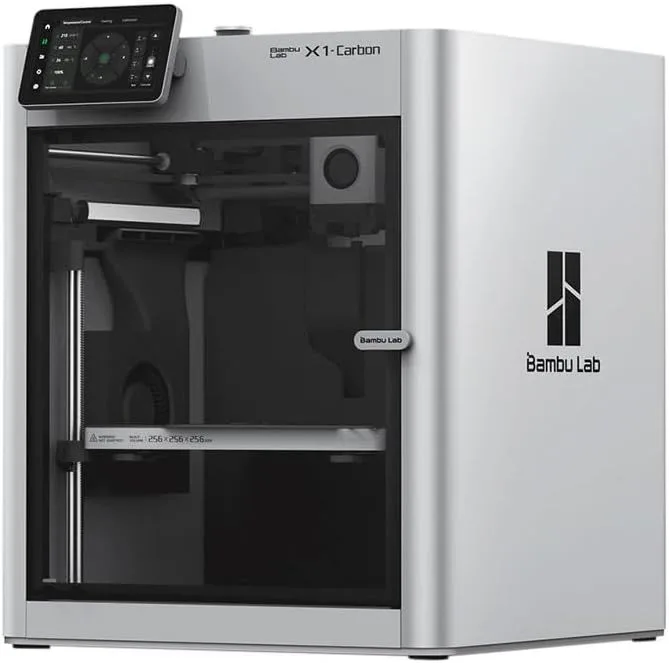
Bambu Lab X1 Carbon
The X1 Carbon dominates on raw capability. LIDAR first-layer inspection catches failures before they waste hours of filament. CoreXY motion delivers consistent 500mm/s prints. The AMS supports up to 16 colors. The enclosed chamber handles every filament type including carbon fiber composites. We recommend the X1 Carbon for users who need the machine to produce finished parts with minimal babysitting — it earns its premium through reliability at speed and material versatility.
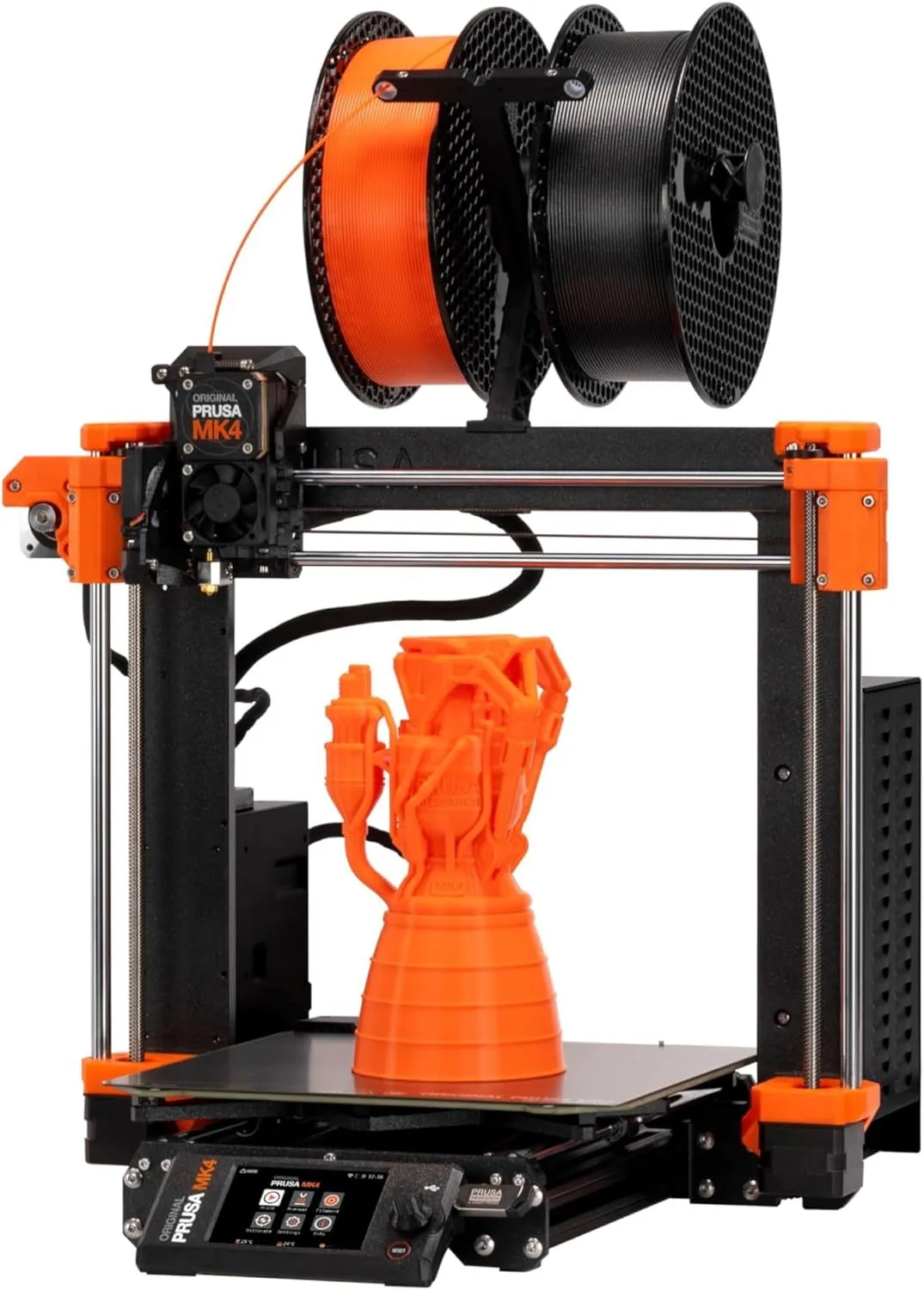
Prusa MK4S
The MK4S wins on dimensional accuracy, slicer quality, and open-source principles. The load cell sensor produces first layers that are measurably more precise than LIDAR-calibrated machines. PrusaSlicer is the gold standard — the slicer that OrcaSlicer and Bambu Studio forked from. Every firmware setting is accessible, every print parameter is tunable, and every hardware component is documented with replacement part numbers. The MK4S costs 33% less and offers a fundamentally different relationship with your machine.
00_ SPEC_COMPARISON
[ TECHNICAL_READOUT ]
| PARAMETER | X1_CARBON | MK4S |
|---|---|---|
| PRINT_SPEED | 500mm/s maxcheck_circle | 250mm/s max (Input Shaper) |
| BUILD_VOLUME | 256 × 256 × 256mmcheck_circle | 250 × 210 × 220mm |
| MOTION_SYSTEM | FDM, CoreXYcheck_circle | FDM, Cartesian |
| EXTRUDER | All-metal 300°C, hardened steel nozzlecheck_circle | Nextruder direct drive, high-flow CHT nozzle |
| AUTO_LEVELING | 7μm LIDAR + full auto-calibrationcheck_circle | Load cell sensor |
| ENCLOSURE | Fully enclosed, activated carbon filtercheck_circle | Open frame (enclosure sold separately) |
| CONNECTIVITY | WiFi, Bambu Studio | WiFi, Ethernet, NFC, Prusa Connectcheck_circle |
| NOISE_LEVEL | ~50dBdrag_handle | ~50dBdrag_handle |
6
X1C WINS
1
MK4S WINS
1
TIED
01_
CALIBRATION PHILOSOPHY
Two completely different approaches to the same fundamental problem: making the first layer stick perfectly.
The X1 Carbon uses a 7-micron LIDAR scanner that maps the bed surface before every print. It detects warped beds, debris, and even spaghetti failures mid-print — if the first few layers deviate from the expected geometry, the machine pauses and alerts you. This is active quality control during the print, not just pre-print calibration. For overnight prints or print farms where nobody is watching, the LIDAR system prevents multi-hour failures from consuming filament and time.
The MK4S uses a load cell sensor — a strain gauge built into the print head that measures the force of the nozzle touching the bed. This produces Z-offset measurements with sub-micron precision. The load cell does not scan the bed surface visually. It does not detect mid-print failures. What it does is produce first layers that are measurably more dimensionally accurate than any other consumer machine. For engineering parts where 0.01mm tolerance matters, the load cell approach wins on pure precision.
The philosophical difference: the X1 Carbon assumes things will go wrong and builds systems to detect failures. The MK4S assumes you will get calibration right and gives you the most precise tools to do so. One is fault-tolerant. The other is precision-optimized. Neither approach is wrong — they optimize for different priorities.
In practical terms: the X1 Carbon's LIDAR catches about 85-90% of first-layer failures before they become multi-hour print disasters. The remaining 10-15% (subtle under-extrusion, partial bed adhesion that holds initially then releases mid-print) still slip through. The MK4S load cell prevents first-layer failures through superior Z-offset precision — the first layer sticks because the nozzle-to-bed distance is correct to sub-micron tolerance. Different strategies, comparable outcomes for an attentive user. The LIDAR advantage grows for unattended printing where nobody is watching the first few layers. Read our X1 Carbon review for the full LIDAR analysis and the MK4S review for load cell testing data.
X1_CARBON: LIDAR
- → 7μm bed surface scanning
- → Mid-print spaghetti detection
- → Active failure prevention
- → Per-print full recalibration
MK4S: LOAD CELL
- → Sub-micron force sensing
- → No visual inspection
- → Highest Z-offset precision
- → No mid-print monitoring
02_
THE REAL SPEED GAP
500mm/s versus 250mm/s. On paper, the X1 Carbon is twice as fast. In practice, the gap is real but substantially smaller than spec sheets suggest.
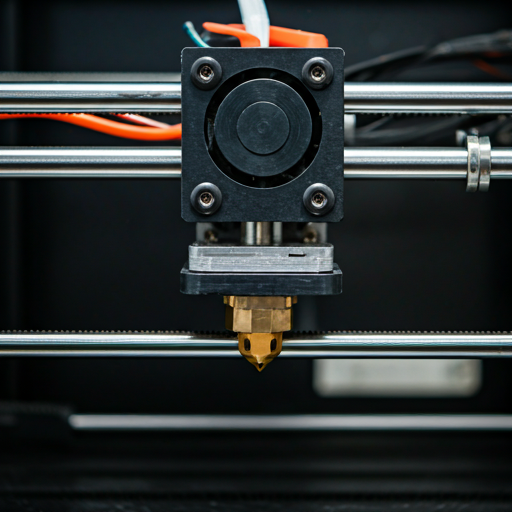
The MK4S ships with a high-flow CHT nozzle — a three-channel design that melts filament faster than standard nozzles, allowing higher volumetric flow rates even at lower travel speeds. The Input Shaper firmware tunes vibration compensation for the bed-slinger architecture, pushing real-world print speeds closer to 200mm/s effective average on complex geometry. The X1 Carbon's CoreXY architecture averages ~350mm/s on the same geometry.
On a standard Benchy: X1 Carbon finishes in approximately 14 minutes. MK4S finishes in approximately 22 minutes. That is an 8-minute gap — real, but not life-changing for single prints. Where the gap compounds: print farms and batch production. Running 20 identical parts overnight, the X1 Carbon saves 2.5 hours. For a single hobbyist printing 1-3 objects per session, the speed premium of the X1 Carbon is invisible in daily workflow.
The MK4S has one speed advantage the X1 Carbon cannot match: 360-degree cooling. The Nextruder's cooling system blows air from every angle simultaneously, allowing steep overhangs (60-70° without supports) at speed. The X1 Carbon's dual-fan cooling covers approximately 270 degrees — good, but not complete. On complex models with steep overhangs, the MK4S can sustain higher speeds without support structures, which reduces both print time and post-processing cleanup. For ornamental prints with delicate features — vases, sculptures, architectural models — the 360-degree cooling is a genuine advantage that no Bambu machine currently offers.
Acceleration tells a complementary story. The X1 Carbon's 20,000mm/s² acceleration means the print head reaches target speed faster after every directional change. The MK4S, limited by bed-slinger physics, tops out at lower acceleration values — the moving bed has mass that cannot accelerate as quickly as a lightweight CoreXY head. On geometry with frequent directional changes (dense infill, thin-wall models, text engravings), the acceleration gap compounds into 10-20% faster completion times on the X1 Carbon. On simple geometry with long straight paths (large flat panels, box shapes, cylindrical objects), the gap narrows to under 5%.
Both machines finish a standard phone case in under an hour. Both complete a detailed figurine in 2-4 hours. The speed difference matters for production workflows. For hobby use, it rarely determines which printer you should buy. Print quality at speed is where the X1 Carbon justifies its premium — LIDAR monitoring guarantees the fast prints are also correct prints, catching failures that the MK4S would complete as wasted plastic.
REAL_AVG
REAL_AVG
03_
OPEN SOURCE VS CLOSED SYSTEM
This is the most contentious divide in 3D printing culture right now. It is not about specs — it is about values, about what kind of relationship you want with the machine sitting on your desk.
The MK4S runs on fully open firmware. Every parameter is documented. The hardware schematics are published. Replacement parts have part numbers. PrusaSlicer is open-source software that the entire industry (including Bambu Lab) has forked as their starting point. When something breaks, you diagnose it yourself, order a $15 replacement part, and fix it with a guide written by someone who did the same repair last month. The MK4S owner community is the most technically literate in consumer 3D printing.
The X1 Carbon runs on proprietary Bambu firmware. Settings are abstracted behind a polished interface. The hardware design is closed. Bambu Studio — while excellent — does not expose the same depth of configuration as PrusaSlicer. When something breaks, you contact Bambu support or buy a Bambu-branded replacement module. The upside: things break less often because the closed system is optimized end-to-end. The downside: when they do break, you are dependent on one company's support infrastructure, parts availability, and willingness to continue supporting that specific model. Bambu's track record here is solid — firmware updates arrive regularly and support response times are reasonable — but the dependency is structural, not performance-based.
Look, the open-source argument is not just ideological. The Ender 3's open firmware is what allowed Klipper to exist. PrusaSlicer's open codebase is what allowed OrcaSlicer and Bambu Studio to exist. The entire modern 3D printing ecosystem was built on open-source contributions. The MK4S continues that tradition. The X1 Carbon benefits from it while contributing less back. Whether that matters to you is a personal decision — but the maker community's opinion on this divide is strong and vocal.
There is also a practical longevity argument. Prusa has been producing and supporting printers for over a decade. The MK4S is the latest in a lineage stretching back to the MK1. Spare parts for MK3 models — released in 2017 — are still available. Bambu Lab was founded in 2022. The X1 Carbon is excellent hardware, but its long-term support horizon is shorter by simple mathematics. Four years of track record versus ten. Both companies show strong commitment to their user base, but the MK4S comes with a longer institutional history backing it.
The Bambu Lab controversy around firmware restrictions (telemetry, mandatory cloud connectivity for some features, reduced third-party slicer compatibility in early firmware) added fuel to this debate in the community. Bambu has addressed many concerns through updates, but the philosophical tension remains: Bambu optimizes the user experience by controlling the stack. Prusa optimizes the user's autonomy by opening the stack. Your preference between those two models predicts which printer you will love owning over the next three to five years of daily use.
04_
ENCLOSURE & MATERIALS
The X1 Carbon comes fully enclosed with an activated carbon filter. It prints every consumer filament type: PLA, PETG, TPU, ABS, ASA, nylon, polycarbonate, and carbon fiber composites. The hardened steel nozzle handles abrasive filaments without degradation. The enclosed chamber maintains stable temperatures for engineering materials. This is the widest material compatibility of any consumer printer under the $1,000+ price point.
The MK4S is open-frame. PLA and PETG print flawlessly. TPU works with careful retraction tuning. ABS and ASA require an aftermarket enclosure — Prusa sells one for $200+ that adds chamber heating to 55°C when combined with the Core One conversion kit (total upgrade cost: $449-649). Without an enclosure, ABS and ASA printing is unreliable on the MK4S.
If your material needs are PLA, PETG, and TPU, the MK4S handles all three and saves $400+ versus the X1 Carbon. If you need ABS, ASA, nylon, or carbon fiber on day one, the X1 Carbon includes the enclosure in the box. Buying a MK4S plus a Prusa Enclosure plus the Core One kit approaches the X1 Carbon's price while delivering less speed and no LIDAR — at that point, the X1 Carbon is the better value for enclosed printing.
The MK4S build plate (250 × 210mm) is slightly smaller than the X1 Carbon's 256mm cube in X and Y, but offers 220mm Z-height versus 256mm. In practice, both accommodate the vast majority of consumer 3D prints without modification. The size difference only surfaces on large-format prints — and at that scale, neither machine competes with the 350mm build volume machines in the market. The X1 Carbon review covers material testing in detail for every supported filament type.
* MK4S CAN print ABS/ASA with aftermarket enclosure ($200+)
05_
THE VALUE EQUATION
The X1 Carbon costs notably more expensive the MK4S. That $400 gap buys: LIDAR calibration, CoreXY speed, an enclosed chamber, a hardened steel nozzle, and AMS multi-color support up to 16 colors. Every one of those features has real utility. The question is whether YOUR workflow uses them.
If you print PLA and PETG on a desk in your home office, the MK4S at $799 (or $499 as a kit) delivers identical or superior print quality to the X1 Carbon. The load cell first-layer precision is better. PrusaSlicer is better. The open firmware is more configurable. You do not need an enclosure, LIDAR, or a hardened nozzle for standard materials. The $400 saved buys a filament dryer, 10+ spools of material, and a UPS battery backup for overnight prints — a more practical investment than features you will never activate.
If you print carbon fiber composites, run overnight print jobs without supervision, need ABS/ASA/nylon capability from day one, or operate a small print business where hourly throughput matters — the X1 Carbon's premium is justified by features you will use weekly. The LIDAR alone pays for itself the first time it catches a spaghetti failure that would have wasted 8 hours of filament and machine time on the MK4S.
One more factor: the P2S at the mid-range tier occupies the space between these two machines. It lacks the X1 Carbon's LIDAR and hardened nozzle but includes the DynaSense servo extruder, enclosed chamber, and touchscreen at less than half the X1 Carbon's price. If you want enclosed Bambu printing without paying X1 Carbon premium, the P2S is worth considering before making this decision. The X1 Carbon's strongest justification is the LIDAR system and the hardened nozzle — if you do not need automated failure detection or carbon fiber filament support, the premium over the P2S is hard to justify on a pure value basis for home hobbyist use.
The X1 Carbon wins 6 of 8 spec categories. But the P2S at $549 delivers 90% of the X1 Carbon experience for 45% of the cost — and the MK4S delivers something neither Bambu machine can: full owner control over every parameter. The X1 Carbon is the fastest, most capable machine in this comparison. The MK4S is the machine you understand completely. At $799 (or ~$499 as a kit), the MK4S leaves $400 in your pocket — enough for a Prusa Enclosure, a filament dryer, and a dozen spools of material to actually print with.
WHO SHOULD BUY WHICH
BUY THE X1 CARBON
You run a small business or print farm where uptime matters more than tinkering. You print engineering materials — carbon fiber composites, nylon, polycarbonate — and need an enclosed chamber on day one. You want LIDAR failure detection for overnight prints that cannot afford to waste 8 hours on a spaghetti failure. You value speed and automation over configurability. You are comfortable paying a premium for a machine that optimizes every subsystem as a closed unit.
- LIDAR FAILURE DETECTION
- HARDENED STEEL NOZZLE
- ENCLOSED + CARBON FILTER
- AMS UP TO 16 COLORS
BUY THE MK4S
You care about open-source principles and want full control over your machine. You prioritize dimensional accuracy over raw speed — engineering parts, mechanical prototypes, precision fits. You are comfortable learning PrusaSlicer's deeper settings (and will be rewarded for it). You print PLA, PETG, and TPU — the three materials that cover 90% of hobby use — and do not need an enclosure immediately. You want the best slicer in the industry and the most knowledgeable owner community. The full breakdown is in our MK4S review.
- LOAD CELL PRECISION
- 360° COOLING
- OPEN-SOURCE FIRMWARE
- PRUSASLICER GOLD STANDARD
VERSUS_DATA
Is the Prusa MK4S good for beginners?expand_more
Is Bambu x1 Carbon discontinued?expand_more
What are common Prusa MK4 problems?expand_more
Can the MK4S match X1 Carbon speed?expand_more
What 3D printer does Jay Leno use?expand_more
This comparison draws on 7,800 X1 Carbon reviews and 4,200 MK4S reviews across Amazon, Google Shopping, and direct-purchase channels. Cross-referenced with spec verification, community testing data from r/3Dprinting and the Prusa Community forum, and dimensional accuracy benchmarks published by third-party testing channels. We do not fabricate hands-on testing claims — our authority comes from synthesizing more real-user data than any single reviewer generates.
