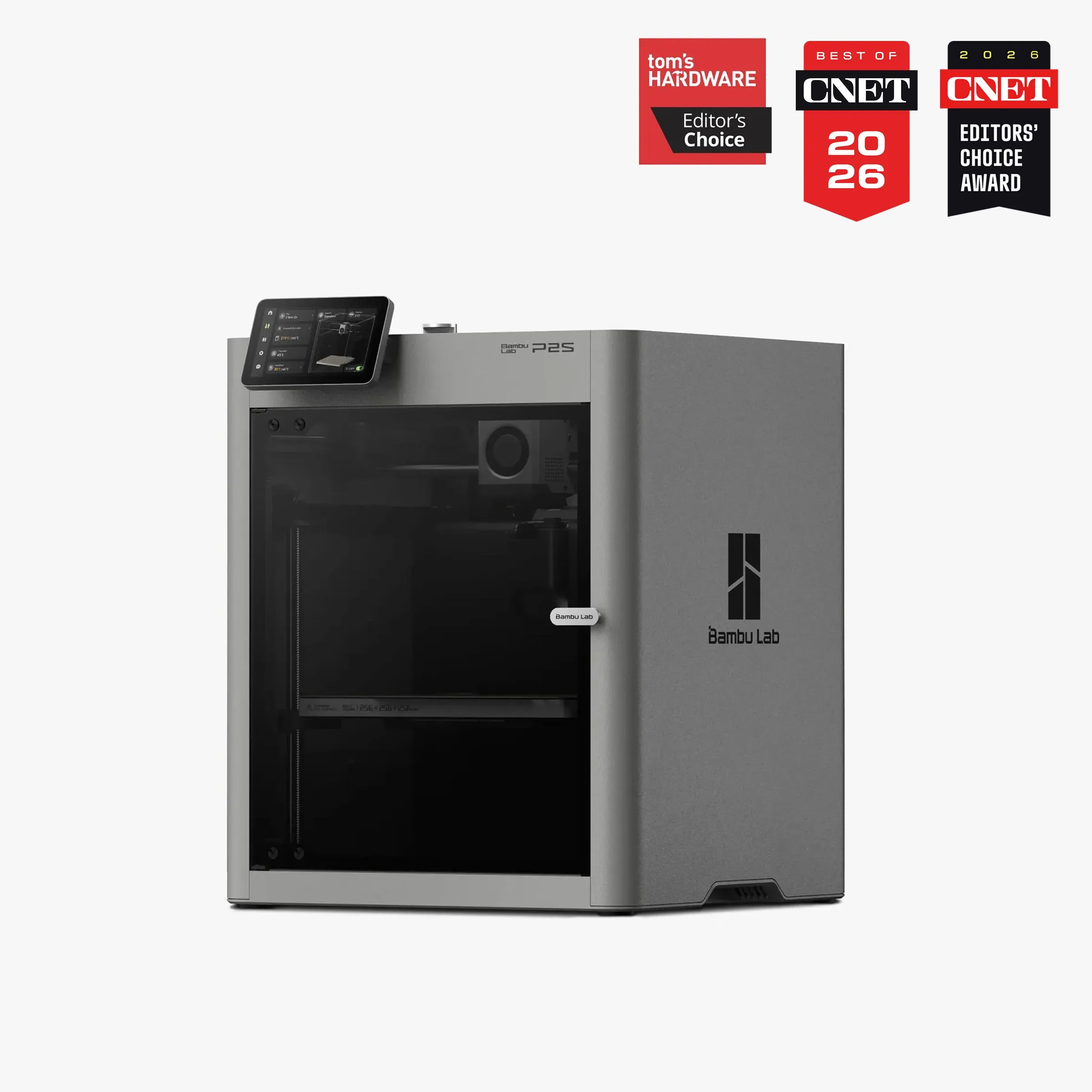
Bambu Lab P2S vs Prusa MK4S
$400–$600
Not on Amazon US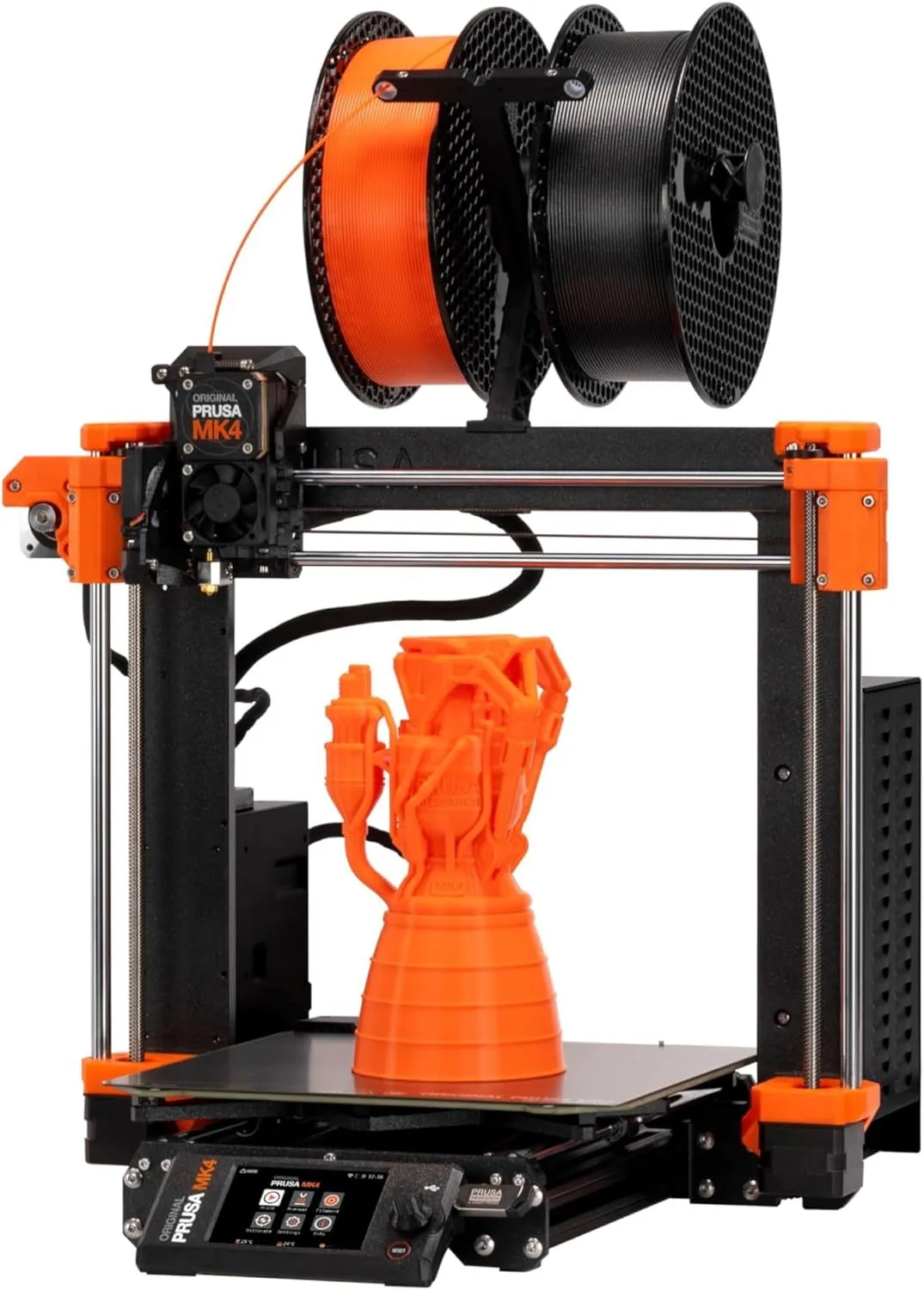
ECOSYSTEM POLISH VS OPEN-SOURCE PRECISION
Bambu Lab P2S
The P2S wins on features per dollar. Enclosed CoreXY at $549, DynaSense servo extruder, 5-inch touchscreen, AI clog detection, quick-swap nozzles, and the most polished slicer ecosystem in consumer 3D printing. The P2S costs $250 less than the assembled MK4S yet includes an enclosure, a servo extruder, and a 1080p AI camera that the MK4S lacks entirely. For buyers who want a printer that handles PLA through ASA with minimal intervention, the P2S is the more complete package at the lower price.
Prusa MK4S
The MK4S wins on dimensional accuracy, slicer depth, and philosophical principle. The load cell sensor produces sub-micron Z-offset measurements that no consumer machine matches. PrusaSlicer is the slicer that Bambu Studio and OrcaSlicer forked from — the upstream gold standard. Every firmware parameter is documented, every hardware part has a replacement part number, and the entire community operates in the open. The MK4S costs more for less hardware — and earns it by giving you full ownership of your machine.
00_ SPEC_COMPARISON
[ COREXY_VS_BEDSLING ]
| PARAMETER | P2S | MK4S |
|---|---|---|
| PRINT_SPEED | 500mm/s maxcheck_circle | 250mm/s max (Input Shaper) |
| BUILD_VOLUME | 256 × 256 × 256mmcheck_circle | 250 × 210 × 220mm |
| MOTION_SYSTEM | FDM, CoreXYcheck_circle | FDM, Cartesian |
| EXTRUDER | DynaSense PMSM servo, 300°Ccheck_circle | Nextruder direct drive, high-flow CHT nozzle |
| AUTO_LEVELING | Full auto-calibration | Load cell sensorcheck_circle |
| ENCLOSURE | Fully enclosed, adaptive airflowcheck_circle | Open frame (enclosure sold separately) |
| CONNECTIVITY | WiFi, Bambu Studio | WiFi, Ethernet, NFC, Prusa Connectcheck_circle |
| NOISE_LEVEL | ~49dBcheck_circle | ~50dB |
5
P2S WINS
2
MK4S WINS
1
TIED
01_
MOTION ARCHITECTURE
CoreXY versus bed-slinger is the fundamental architectural divide in consumer FDM printing, and these two machines represent the best of each approach.
The P2S uses CoreXY — the print head moves in X and Y while the bed moves only in Z. This means the heavy bed never accelerates horizontally, allowing the lightweight print head to sustain 500mm/s with 20,000mm/s² acceleration. On a standard Benchy, the P2S finishes in approximately 15 minutes. The architecture scales: complex geometry with frequent directional changes loses minimal speed because the low-mass head can reverse direction almost instantly.
The MK4S uses a bed-slinger design — the bed moves in Y, the head moves in X, and both move in Z. The bed has mass. Physics limits how fast mass can accelerate and decelerate without vibration. The MK4S Input Shaper firmware compensates for this by predicting vibration patterns and adjusting motor timing to cancel resonance peaks. Real-world effective speed: approximately 200mm/s average on complex geometry, 250mm/s on simple paths. A standard Benchy takes approximately 22 minutes — seven minutes slower than the P2S.
Where the bed-slinger wins: the 360-degree part cooling system on the MK4S Nextruder blows air from every angle simultaneously. This allows steep overhangs (60-70° without supports) at speed. The P2S cooling covers approximately 270 degrees — good but not complete. On ornamental prints with delicate unsupported features — vases, sculptures, articulated figurines — the MK4S produces cleaner results with fewer support scars. For a deeper analysis of the motion system tradeoffs, read the P2S review and the MK4S review.
Acceleration tells the practical story. The P2S 20,000mm/s² acceleration means the print head reaches target speed faster after every directional change — frequent changes happen on infill, thin walls, text engravings, and any model with small features. The MK4S, limited by the mass of the moving bed, tops out at lower acceleration values. On geometry with many direction reversals, the CoreXY acceleration advantage compounds into 15-25% faster completion times. On simple geometry with long straight paths — large flat panels, cylindrical objects, box shapes — the gap narrows to under 5%. Most real-world prints fall somewhere in between, giving the P2S a consistent 25-35% speed edge on a typical mix of models.
REAL_AVG_SPEED
REAL_AVG_SPEED
02_
EXTRUDER PHILOSOPHY
The P2S DynaSense is a PMSM servo motor that measures resistance in real time. If filament starts grinding — a common failure mode on standard stepper extruders — the servo adjusts push force before a clog forms. The 8.5 kg push force is 70% higher than the P1S it replaced, which means flexible filaments like TPU at 85A shore hardness feed reliably at 60-80mm/s. The quick-swap nozzle changes in 30 seconds with a one-clip mechanism — switching between 0.4mm detail work and 0.6mm rapid prototyping takes less time than loading a new model into the slicer.
The MK4S Nextruder uses a different strategy: a high-flow CHT nozzle with three internal channels that melt filament faster than single-bore designs. The load cell sensor built into the extruder assembly measures nozzle-to-bed force with sub-micron precision — this is the most accurate Z-offset measurement on any consumer machine. The first layer is where most print failures begin, and the MK4S prevents them through mechanical precision rather than software detection. The trade-off: if a print fails at layer 50, the MK4S has no AI camera to catch it. You'll come back to a completed spaghetti sculpture and a wasted spool.
Look, these are genuinely different philosophies about where to invest engineering effort. The P2S prevents clog failures (extrusion path) and detects print failures (camera + AI). The MK4S prevents adhesion failures (load cell precision) and trusts the user to monitor the rest. Neither approach is wrong — they optimize for different failure modes. If you print overnight and walk away, the P2S failure detection is worth more. If you watch your prints and care about dimensional tolerances on engineering parts, the MK4S precision is worth more.
Nozzle material: the P2S ships with a brass nozzle. The MK4S ships with a steel CHT nozzle. Neither handles carbon fiber composites — for that, look at the X1 Carbon with its hardened steel nozzle. Both machines handle PLA, PETG, TPU, ABS, and ASA. The MK4S CHT nozzle lasts longer on abrasive-adjacent materials like glass-filled PETG.
03_
THE ECOSYSTEM DIVIDE
This is where the comparison stops being about hardware and starts being about values.
Bambu Studio is polished, fast, and integrated. RFID filament detection auto-loads print profiles. Cloud print management lets you queue jobs from your phone. The community profile library is the largest of any slicer — thousands of tested settings for every filament brand you can buy on Amazon. AMS integration is native. The Bambu Handy app sends push notifications on print progress and failures. For users who want the machine to handle decisions, Bambu Studio is the most frictionless experience in consumer 3D printing.
PrusaSlicer is the upstream codebase that Bambu Studio and OrcaSlicer forked from. It exposes more parameters, offers deeper control over every print variable, and runs locally without cloud dependency. The community has created profiles for machines from a dozen manufacturers — PrusaSlicer is not locked to Prusa hardware. The open-source ecosystem means bugs get fixed by the community, new features come from pull requests by users who need them, and the slicer will exist as long as the community maintains it. PrusaSlicer does not have RFID integration or cloud queuing. It has something else: complete transparency about what your printer is doing and why.
The repairability gap is real. Every Prusa part has a public part number, a replacement guide, and community documentation. The MK4S wiring harness, extruder gears, and heat break are all user-serviceable with published guides. Bambu's P2S uses proprietary modules — the DynaSense extruder assembly, the mainboard, the touchscreen — that require ordering from Bambu directly. Bambu support is responsive and parts ship quickly, but you are dependent on one company's supply chain and willingness to stock parts for this specific model. Prusa has stocked parts for the MK3 (released 2017) for nearly a decade.
Multi-color adds another dimension. The P2S supports AMS and AMS 2 Pro (4-16 colors with integrated filament drying). The MK4S supports MMU3 (Multi-Material Upgrade 3) — Prusa's multi-color system with 5 inputs. The AMS is more mature, handles more colors, and has better community troubleshooting resources. The MMU3 is newer and still accumulating the community knowledge base that the AMS benefits from. For multi-color printing, the Bambu ecosystem is currently stronger. See the Kobra S1 Combo review for how third-party multi-color systems compare.
The Bambu Lab cloud controversy matters here. Bambu has faced community pushback over telemetry collection, cloud-gated features, and reduced third-party slicer compatibility in earlier firmware. Most concerns have been addressed through updates, and local LAN-only mode is available. But the structural dependency remains: Bambu Studio is the best path to the best P2S experience, and Bambu Studio connects to Bambu's servers by default. PrusaSlicer runs entirely locally. Your print data never leaves your network. For users in corporate environments, educational institutions, or anyone who values network isolation, the MK4S slicer stack is simpler to justify to an IT department.
04_
ENCLOSED VS OPEN-FRAME
The P2S ships fully enclosed with an adaptive airflow system and activated carbon filter. ABS, ASA, nylon, and PETG all print reliably in the controlled chamber environment. The adaptive airflow solved the P1S heat creep problem — the chamber temperature is actively managed rather than passively accumulated. Noise stays under 49dB. For apartment dwellers and home-office users, the enclosure is not optional — it's the reason to buy this machine over an open-frame alternative.
The MK4S is open-frame. PLA and PETG print flawlessly. TPU works with careful retraction settings. ABS and ASA require an aftermarket enclosure — Prusa sells the Prusa Enclosure for $200+ that adds chamber temperature control, or you can convert to the Core One ($449-649 upgrade kit) with active heating to 55°C. Without an enclosure, ABS prints curl at the edges after 30-40 layers. ASA is slightly more forgiving but still requires draft-free conditions that an open frame cannot guarantee.
Here's the thing: if your material needs are PLA, PETG, and TPU — which covers 90% of hobby printing — the MK4S open frame is not a disadvantage. The load cell delivers better first-layer adhesion than the P2S auto-calibration on these materials. Open-frame access makes filament changes faster, nozzle inspection easier, and mid-print interventions possible without opening a door and disrupting chamber temperature. The P2S enclosure becomes essential only when you need ABS, ASA, nylon, or consistent temperature for multi-hour technical prints. Noise is a factor for shared spaces: the P2S at under 49dB is quieter than the open-frame MK4S at approximately 50dB, though both are quiet enough for a separate room. The enclosure contains vibration noise that the open frame transmits directly to the desk surface.
* MK4S CAN print ABS/ASA with Prusa Enclosure ($200+) or Core One kit ($449+)
05_
THE $250 QUESTION
The P2S costs $549. The assembled MK4S costs $799. The cheaper machine includes an enclosure, a servo extruder, a 5-inch touchscreen, an AI camera, and quick-swap nozzles. The more expensive machine has none of those features. On a feature-per-dollar comparison, the P2S wins by a wide margin. So why does the MK4S exist at this price point?
The MK4S kit at $499 changes the equation. Building the kit takes 4-6 hours and teaches you every subsystem of your machine. Kit builders report fewer long-term issues because they understand how components fit together — when something loosens after 200 hours of printing, they know which bolt to tighten. At $499, the MK4S undercuts the P2S by $50 while delivering the best first-layer precision and the best slicer in consumer 3D printing. The kit option is the reason the MK4S remains competitive against machines that include more hardware at a lower assembled price.
One factor that rarely appears in comparisons: total cost of ownership over two years. Prusa replacement parts are inexpensive and available from multiple suppliers (official and third-party). The Nextruder heat break costs $15. The steel nozzle costs $8. The entire extruder assembly can be rebuilt for under $60. Bambu replacement modules are more expensive and available only from Bambu directly. The DynaSense extruder module is a complete assembly — if one component fails, you replace the whole unit. Over two years of heavy use, the MK4S maintenance costs are lower and more predictable.
For users who want enclosed printing without the MK4S price escalation, consider the Bambu Lab A1 at $399 (open-frame Bambu) or the P2S as the enclosed option. The MK4S plus Prusa Enclosure ($200+) approaches the X1 Carbon's price while delivering less speed and no LIDAR — at that combined cost, the P2S or even the X1 Carbon becomes the better value for enclosed printing.
The P2S costs $250 less than the assembled MK4S yet includes more hardware features. The MK4S at $499 as a kit undercuts the P2S by $50 and delivers the best first-layer precision in consumer 3D printing. The pricing inversion is the story of this comparison: the cheaper assembled machine wins on feature count, the cheaper kit machine wins on precision and repairability. Neither is overpriced — they are priced for different buyers who value different things. The spec sheet says P2S. The philosophy says MK4S. Your purchase tells you which kind of maker you are.
WHO SHOULD BUY WHICH
BUY THE P2S
You want enclosed printing that handles PLA through ASA without aftermarket additions. You value ecosystem polish — Bambu Studio, RFID filament detection, cloud queuing, push notifications on print failures. You print overnight and need AI failure detection to prevent wasted filament. You switch nozzle sizes frequently and want 30-second quick-swap instead of a heated wrench procedure. You prefer the machine to make decisions so you can focus on designing, not tuning. The P2S 91.5% positive rate across 5,600+ reviews reflects a machine optimized for frictionless daily use.
- DYNASENSE SERVO + AI CAMERA
- FULLY ENCLOSED + ADAPTIVE AIRFLOW
- 500MM/S COREXY SPEED
- AMS 2 PRO UP TO 16 COLORS
Not on Amazon US — Bambu Lab Store / Best Buy / Micro Center
BUY THE MK4S
You care about open-source principles and want full control over your machine's firmware, hardware, and slicer. You prioritize dimensional accuracy — engineering prototypes, mechanical parts, precision fits where 0.01mm matters. You want PrusaSlicer's depth of control and the most knowledgeable owner community in consumer 3D printing. You print PLA, PETG, and TPU — the materials that cover 90% of hobby use — and are willing to add an enclosure later if ABS becomes necessary. The kit at $499 is the best value in the comparison if you're willing to invest 4-6 hours of assembly. Read the full MK4S review for long-term ownership analysis.
- LOAD CELL FIRST-LAYER PRECISION
- OPEN-SOURCE FIRMWARE + HARDWARE
- 360° PART COOLING
- KIT OPTION AT $499
FIELD_QUERIES
Is the Bambu Lab P2S worth it? expand_more
Is the Prusa MK4S good for beginners? expand_more
Is the P2S available in the US? expand_more
What are common Prusa MK4 problems? expand_more
What is the difference between the Prusa MK4 and MK4S? expand_more
P2S data: 5,600 Google Shopping reviews, 4.8-star average, 91.5% positive sentiment. MK4S data: 4,200 reviews across Amazon and direct-purchase channels, 4.5-star average. Cross-referenced with Bambu ecosystem data (700+ P1S reviews for lineage context) and Prusa ecosystem data (Core One, MK3S+). Spec comparisons use manufacturer specifications verified against owner reports and third-party benchmarks. We do not fabricate hands-on testing claims — we synthesize the largest independent review dataset available for both products.
