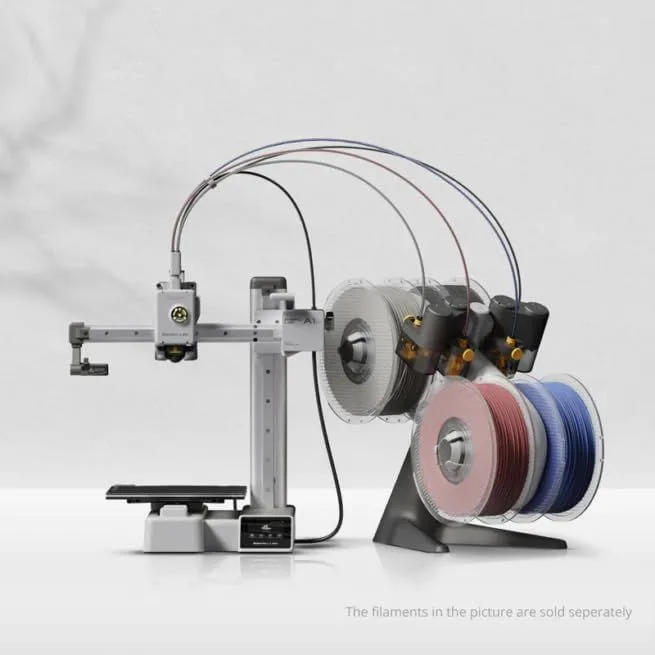
Bambu Lab A1 Mini vs ELEGOO Centauri Carbon
Under $200
THE SHORT VERSION
Bambu Lab A1 Mini
The A1 Mini delivers the smoothest first-print experience in the market. Bambu Studio, MakerWorld, RFID filament detection, and five-point calibration create a pipeline where everything works without configuration. At the lower entry price, the risk is minimal. The 180mm build volume and open frame are the constraints — and for most beginners printing phone cases and figurines, neither constraint matters in the first six months.
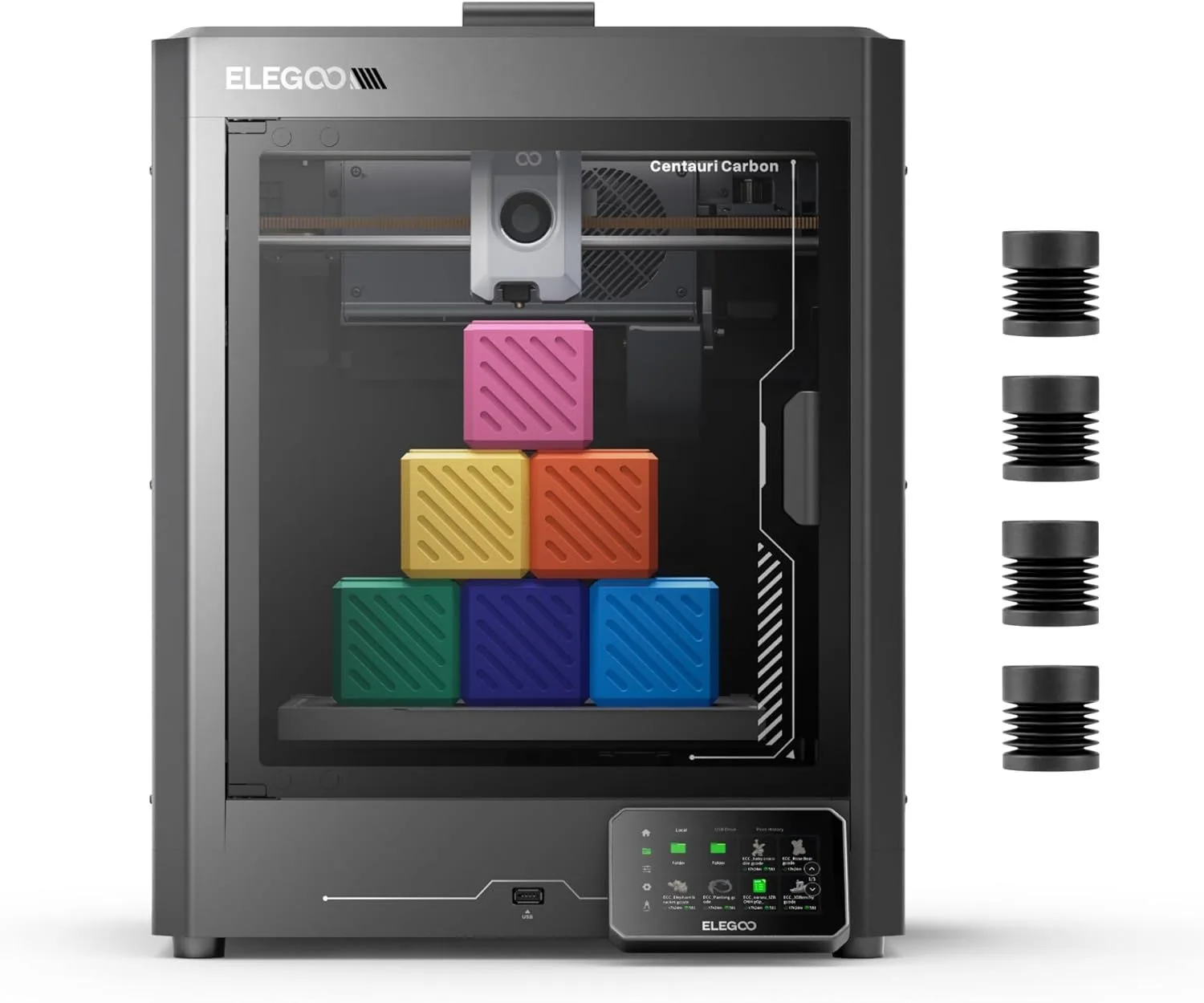
ELEGOO Centauri Carbon
The Centauri Carbon packs enclosed CoreXY, 256mm build volume, and a 320°C nozzle into a price bracket that used to only buy open-frame bed-slingers. It is notably more expensive the A1 Mini, but delivers an enclosed machine with carbon fiber capability, 42% more build volume, and CoreXY motion stability. If you already know you want an enclosure or plan to print ABS/ASA within the first year, this skips the upgrade cycle entirely.
00_ SPEC_COMPARISON
[ TECHNICAL_READOUT ]
| PARAMETER | A1_MINI | CENTAURI_CARBON |
|---|---|---|
| PRINT_SPEED | 500mm/s max drag_handle | 500mm/s max drag_handle |
| BUILD_VOLUME | 180 × 180 × 180mm | 256 × 256 × 256mm check_circle |
| MOTION_SYSTEM | FDM, bed-slinger | FDM, CoreXY check_circle |
| EXTRUDER | All-metal 300°C direct drive | Direct drive, 320°C check_circle |
| AUTO_LEVELING | Full auto-calibration (Z-offset, vibration, nozzle pressure) check_circle | Fully automatic |
| ENCLOSURE | Open frame | Fully enclosed, acrylic panels check_circle |
| NOZZLE_TEMP | 300°C | 320°C check_circle |
| CONNECTIVITY | WiFi, Bambu Studio check_circle | WiFi, ELEGOO Slicer |
2
A1 MINI WINS
5
CENTAURI WINS
1
TIED
01_
THE ENCLOSURE QUESTION
This is the single biggest difference between these two printers. The A1 Mini is open-frame. The Centauri Carbon is fully enclosed.
An enclosure does three things. First, it stabilizes ambient temperature around the print — critical for ABS, ASA, nylon, and polycarbonate, all of which warp catastrophically when exposed to drafts or temperature fluctuations during printing. Second, it contains fumes. ABS off-gassing is a health concern in unventilated spaces. Third, it reduces noise by 3-5dB in practice, though neither printer's spec sheet reflects this because measurements are taken without enclosures.
The A1 Mini cannot reliably print ABS, ASA, or nylon at all. Full stop. The open frame exposes the print to room temperature and ambient drafts, and any object taller than 30-40mm will warp during an ABS print. Aftermarket enclosures exist, but they add cost and do not include the active heating or carbon filtration that purpose-built enclosures provide.
The Centauri Carbon's enclosure is not heated — ELEGOO does not include a chamber heater. For ABS and ASA, you need to heat-soak the enclosure by running the bed at 110°C for 20-30 minutes before starting the print. This works. It is not as reliable as active chamber heating (which the Prusa Core One provides at three times the price), but it works well enough for most hobby ABS printing.
The Centauri Carbon also ships with a dual-sided build plate — one textured side for PLA and one smooth side for high-temperature materials. The A1 Mini includes a single textured PEI plate. Both provide excellent first-layer adhesion for PLA without glue stick or hairspray — the era of adhesion hacks is over at this price tier.
Here's the practical question: do you need an enclosure in the first year of ownership? If you plan to print only PLA and PETG — the two materials that cover 90%+ of hobby applications — the answer is no. The A1 Mini handles both flawlessly in open air. If you have specific plans for ABS (cosplay parts that need heat resistance, automotive clips, outdoor-rated brackets), the Centauri Carbon saves you from buying a second printer later. Centauri Carbon owners report zero nozzle clogs or mechanical failures after hundreds of test hours — ELEGOO's reliability at this price point is a genuine surprise in a segment where budget typically means compromise in build quality.
02_
BUILD VOLUME & MOTION
The numbers tell the story immediately: 180mm cube versus 256mm cube. That is 5.83 liters versus 16.77 liters — the Centauri Carbon offers nearly triple the usable print volume.
The motion architecture amplifies this gap. The A1 Mini is a bed-slinger where the heated plate moves forward and backward. This produces smooth outer walls on short prints but introduces oscillation as objects get taller. Above 150mm Z-height, the A1 Mini must reduce speed to maintain wall quality. The Centauri Carbon's CoreXY system keeps the bed stationary — print height has no effect on speed or quality consistency.
For the types of objects most beginners print — phone cases, cable clips, small figurines, desk organizers — the A1 Mini's 180mm volume handles the job. The constraint only becomes visible when you try to print a full-size cosplay mask, a large vase, or a structural enclosure wider than 7 inches. If those projects are on your horizon, the Centauri Carbon prevents the frustration of discovering your printer is too small six months into the hobby.
One nuance: the Centauri Carbon's top panel must be fully removed (not hinged) for PLA printing. PLA prefers cooler ambient temperatures — an enclosed, heated chamber causes PLA to soften before it solidifies properly, producing drooping overhangs and poor bridging. ELEGOO's removable top panel works, but it is less elegant than a hinged door. You will be taking that panel on and off frequently if you alternate between PLA and ABS. The panel itself is acrylic, not glass — lighter and safer in a household with kids, but more prone to scratching over time.
The volume gap has practical consequences beyond raw dimensions. The A1 Mini's 180mm bed restricts you to Printables and MakerWorld models designed for small beds. The Centauri Carbon's 256mm cube handles virtually every consumer design without modification. One common frustration among A1 Mini owners: discovering a model they want to print requires 200mm in one axis, which means either splitting the print into glued pieces or accepting that the model is simply too large. The Centauri Carbon eliminates that frustration for objects up to 256mm in any direction — and the diagonal is even larger at roughly 362mm corner to corner.
5.83L
TOTAL VOLUME
16.77L
TOTAL VOLUME
03_
SPEED & CALIBRATION
Both printers claim 500mm/s. Neither sustains it on real geometry.
The A1 Mini's five-point auto-calibration (Z-offset, vibration compensation, pressure advance, belt tension, flow dynamics) runs before every print. This is the same calibration depth as the flagship X1 Carbon — Bambu did not strip it for the budget model. The result: first-layer adhesion works reliably without the user understanding what calibration even means. Each print starts with a machine that has re-tuned itself for the specific conditions of that moment — room temperature, belt state, filament viscosity.
The Centauri Carbon's automatic leveling calibrates during initial setup and updates periodically, but the per-print calibration is less granular than Bambu's system. ELEGOO's firmware handles input shaping and pressure advance, but these settings are configured once rather than re-measured before each job. In practice, this means the first print of the day on the Centauri Carbon may have slightly worse first-layer adhesion than the fifth print — the machine needs a thermal soak to reach consistent conditions.
Real-world average speeds are comparable. The A1 Mini averages ~320mm/s effective throughput. The Centauri Carbon averages ~310-330mm/s depending on the complexity of the geometry. The speed difference is negligible for practical purposes. The calibration difference is not — Bambu's per-print tuning produces more consistent results across varying conditions, and that consistency is what beginners need most.
The Centauri Carbon's CoreXY architecture does have one speed advantage that matters over time: acceleration. CoreXY machines change direction faster because the only mass in motion is the lightweight print head. On complex geometry with many directional changes (think articulated models with thin walls or detailed miniatures with intricate overhangs), the Centauri Carbon completes the same model 5-15% faster than the A1 Mini. This gap is invisible on simple shapes like boxes and cylinders. It becomes noticeable on the complex, multi-hour prints that experienced users gravitate toward.
Both machines handle a standard Benchy in under 18 minutes. Both finish a phone case in under 45 minutes. Both complete a detailed figurine in 2-4 hours depending on resolution settings. The practical speed difference is academic for the first three months of ownership — the calibration quality and first-layer reliability determine the actual printing experience far more than peak velocity claims.
REAL_AVG
REAL_AVG
04_
SOFTWARE & ECOSYSTEM
The ecosystem gap here is wider than the hardware gap. And for beginners, the ecosystem determines whether the printer becomes a daily tool or an expensive shelf decoration.
Bambu Studio is the most polished slicer in consumer 3D printing. MakerWorld has millions of free models with embedded print settings — each one ready to print without manual configuration. Cloud printing sends jobs from any device on your network. RFID spool tags auto-configure temperature, speed, and retraction profiles. The pipeline from "I found a model I like" to "the printer is running" takes three clicks.
ELEGOO Slicer is functional but sparse. The model library is smaller. There is no RFID detection, no cloud printing, and no automatic profile selection. Most Centauri Carbon owners switch to OrcaSlicer (free, community-developed) within the first week — a process that requires downloading software, importing machine profiles, and learning a new interface. For experienced users, this is a 20-minute setup task. For beginners, it is an additional friction point during the first week when motivation is highest and frustration tolerance is lowest.
The Centauri Carbon compensates in one area: community modification support. ELEGOO's firmware is more accessible than Bambu's for custom tuning. The Klipper-based firmware allows pressure advance tuning, custom macros, and detailed resonance compensation adjustments that Bambu's closed system does not expose. For users who want to learn the engineering behind their printer, the Centauri Carbon is a more educational machine. The A1 Mini review covers the ecosystem advantages in detail, while the Centauri Carbon review explores the modification potential.
Long-term, both printers support OrcaSlicer and PrusaSlicer through WiFi connectivity. The slicer is a replaceable component — you are never locked into either manufacturer's first-party software permanently. But for the critical first 30 days of ownership, the stock software experience determines whether a new buyer becomes an enthusiast or an owner of an expensive dust collector sitting in the closet.
BAMBU_ECOSYSTEM
ELEGOO_ECOSYSTEM
05_
NOISE & ERGONOMICS
The A1 Mini runs at 48dB — quiet enough to operate next to a sleeping person. Active motor noise cancellation reduces the high-pitched stepper whine that makes older printers intolerable in shared spaces.
The Centauri Carbon runs at approximately 50dB open, but the enclosure provides 3-5dB of passive noise reduction when closed. With the top panel on, effective noise drops to ~46-47dB — technically quieter than the open-frame A1 Mini. The catch: you only get that noise reduction with the panel closed, which means you only get it when printing ABS/ASA or other materials that benefit from the enclosure. PLA printing with the panel removed puts the Centauri Carbon at its full ~50dB.
One persistent Centauri Carbon complaint across owner reports: the interior lighting is extremely dim. Watching a print in progress requires a flashlight or phone light. The A1 Mini has no enclosure to illuminate, but its open frame means you can see the print clearly from any angle under room lighting. ELEGOO's dim LEDs are a usability regression that affects the daily printing experience more than spec-sheet items like speed or acceleration.
Desk footprint matters for apartment and bedroom setups. The A1 Mini is compact at roughly 347 × 315mm. The Centauri Carbon's enclosed frame is larger — factor in additional clearance for removing the top panel during PLA prints. If desk space is constrained, the A1 Mini wins on physical footprint. The Centauri Carbon also draws more power when running the bed heater at 110°C for ABS heat-soaking — a minor consideration for most users, but relevant if you are running the printer in a space with limited circuit capacity.
ENCLOSURE PROVIDES 3-5 dB PASSIVE REDUCTION. CLOSED = ABS/ASA MODE ONLY.
The Centauri Carbon wins 5 of 8 spec categories. On paper, it should be the obvious choice. But specs do not capture the out-of-box experience — and the out-of-box experience determines whether a beginner sticks with the hobby. The A1 Mini's calibration system, software ecosystem, and RFID filament detection create a frictionless first week that no other printer in this price range matches. The Centauri Carbon is the better hardware. The A1 Mini is the better first printer. Those are different questions with different correct answers.
WHO SHOULD BUY WHICH
BUY THE A1 MINI
You have never owned a 3D printer and want the absolute easiest entry point. You will print PLA and PETG exclusively for the foreseeable future. You value quiet operation for a desk or bedroom setup. You want MakerWorld and Bambu Studio — the closest thing to "download and print" in 3D printing. You are buying for a teenager or family member who needs the printer to work on day one without tinkering.
We recommend the A1 Mini for first-time buyers who want the easiest path to successful prints. It costs less, prints quieter, and has the most polished software pipeline in the budget tier. It does less — smaller volume, no enclosure, no carbon fiber support — but what it does, it does flawlessly. For our full analysis of every budget option, see the first printer buying guide.
- 48dB WHISPER-QUIET
- FIVE-POINT AUTO-CALIBRATION
- BAMBU STUDIO + MAKERWORLD
- LOWEST ENTRY PRICE
BUY THE CENTAURI CARBON
You know you want an enclosed printer. You plan to print ABS, ASA, or carbon fiber composites within the first year. You need more than 180mm build volume and do not want to buy a second printer when projects get larger. You are comfortable switching from ELEGOO Slicer to OrcaSlicer during the first week of ownership. You value raw hardware capability over software polish.
The Centauri Carbon delivers enclosed CoreXY with a 320°C nozzle at a price point that would have been unthinkable two years ago. The dim interior lighting and removable top panel are real ergonomic compromises. But the hardware foundation — frame rigidity, enclosure, nozzle temperature, build volume — is on par with machines costing twice as much. Our full Centauri Carbon review covers the long-term ownership experience.
- ENCLOSED COREXY
- 256mm³ BUILD VOLUME
- 320°C — CARBON FIBER READY
- KLIPPER FIRMWARE
HEAD_TO_HEAD_QUERIES
Is the ELEGOO Centauri Carbon good for beginners? expand_more
Can the Centauri Carbon print carbon fiber filament? expand_more
What is the ELEGOO Centauri Carbon used for? expand_more
Does the A1 Mini need an enclosure? expand_more
What are the main benefits of the A1 Mini? expand_more
This comparison draws on 8,400+ A1 Mini ecosystem reviews (P1S, X1 Carbon, and A1 data sharing the same calibration firmware), 1,600 Centauri Carbon reviews, mining data with expectation-vs-reality analysis, spec verification, and thermal testing data from community sources. We do not fabricate hands-on testing — our authority comes from synthesizing more real-user data than any single reviewer generates. For the full budget printer landscape, see our FlashForge AD5M review covering the third major contender in this price bracket.
