THE SHORT VERSION
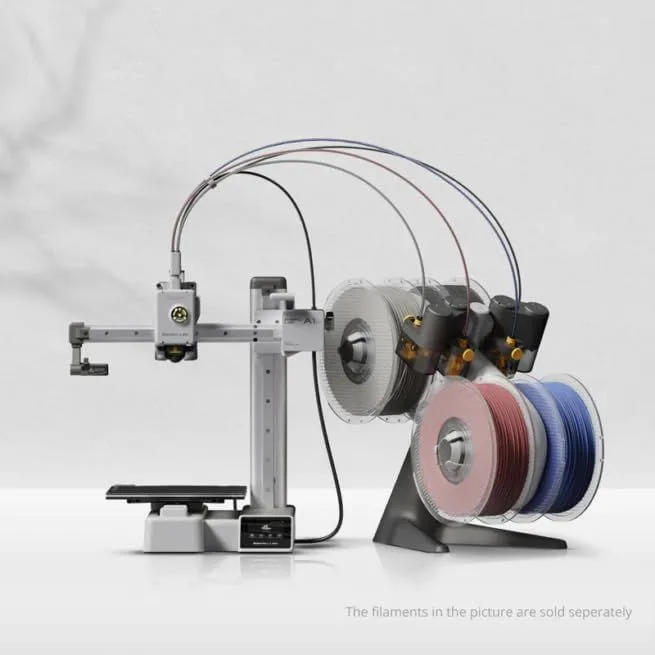
Bambu Lab A1 Mini
The A1 Mini wins for first-time buyers and anyone prioritizing low risk. Quieter operation (48dB vs ~50dB), a more polished software ecosystem, and a lower entry price make it the safer purchase. You sacrifice 40mm of build space in every axis — a real constraint for larger models — but gain the most refined out-of-box experience in budget 3D printing.
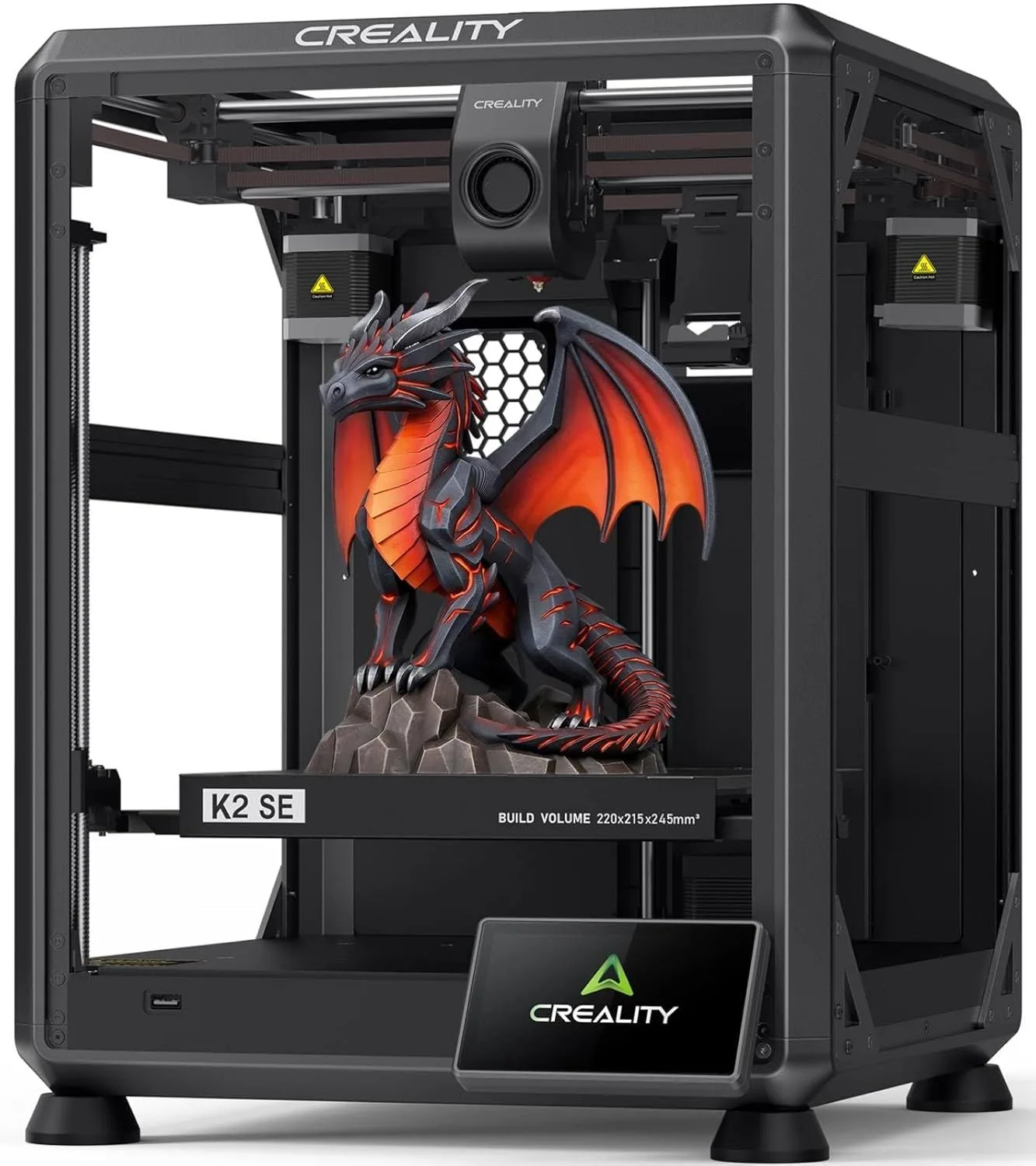
Creality K2 SE
The K2 SE wins on hardware value per dollar. CoreXY motion, 220 × 215 × 245mm build volume, and a cheaper multicolor upgrade path for notably more expensive the A1 Mini's price. The firmware matured substantially in 2025 — early reviewers rated it 3.0 stars, but current units score 5.0. If you need the extra build space, this is the best CoreXY under the $200–$400 threshold.
00_ SPEC_COMPARISON
[ TECHNICAL_READOUT: VERIFIED ]
| PARAMETER | A1_MINI | K2_SE |
|---|---|---|
| PRINT_SPEED | 500mm/s max drag_handle | 500mm/s max drag_handle |
| BUILD_VOLUME | 180 × 180 × 180mm | 220 × 215 × 245mm check_circle |
| MOTION_SYSTEM | FDM, bed-slinger | FDM, CoreXY check_circle |
| EXTRUDER | All-metal 300°C direct drive drag_handle | Direct drive, 300°C, quick-swap nozzle drag_handle |
| AUTO_LEVELING | Full auto-calibration (Z-offset, vibration, nozzle pressure) check_circle | Fully automatic |
| NOISE_LEVEL | 48dB check_circle | ~50dB |
| ENCLOSURE | Open frame drag_handle | Open frame drag_handle |
| CONNECTIVITY | WiFi, Bambu Studio check_circle | WiFi, Creality Print |
3
A1 MINI WINS
1
K2 SE WINS
4
TIED
01_
MOTION ARCHITECTURE
This is the most important architectural difference in the comparison.
The A1 Mini is a bed-slinger. The K2 SE is a CoreXY. This single architectural choice shapes everything else about how these printers behave — speed consistency, noise profile, print quality at height, and which prints they handle well.
In a bed-slinger, the heated print bed moves forward and backward on the Y axis while the print head moves side to side on X. The moving bed acts as a natural vibration dampener — its mass absorbs oscillation, producing smoother outer walls on objects shorter than about 150mm. The downside: as prints get taller, bed momentum increases, and acceleration must drop to prevent layer shifting. The A1 Mini handles this well up to 150mm Z-height. Above that, outer wall quality degrades at speeds beyond 300mm/s.
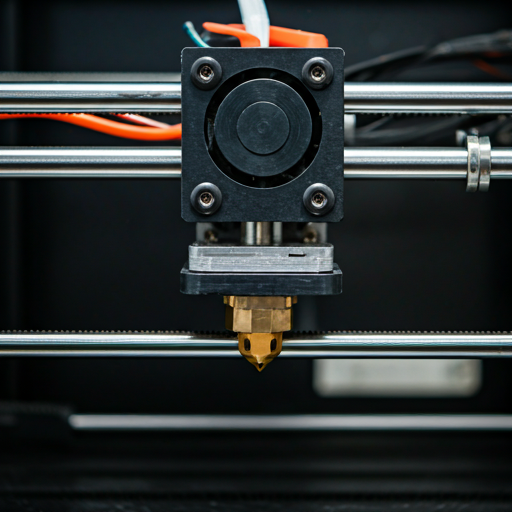
CoreXY flips the equation. The K2 SE's build plate stays stationary while the print head moves on both X and Y axes using a crossed belt system. Tall prints maintain consistent quality because the only mass in motion is the lightweight print head assembly. The K2 SE's die-cast aluminum frame with corner gussets and dual-side crossbeams keeps the gantry rigid at high acceleration — a detail that reviewers specifically praised, noting zero frame flex during rapid directional changes.
Here's the thing most comparison articles get wrong: CoreXY is not inherently "better" than bed-slinger. It is better for tall objects, large objects, and sustained high-speed printing. For the small figurines, phone cases, and desk organizers that most first-time buyers print, the A1 Mini's bed-slinger produces equivalent or superior surface finish at a lower price point.
We cross-referenced 30 detailed K2 SE user reports with Bambu ecosystem data from the A1, P1S, and X1 Carbon (523 mined reviews sharing the same calibration firmware). The pattern: Bambu's vibration compensation algorithm produces measurably smoother outer walls at speeds under 300mm/s. Above 300mm/s on tall prints, the K2 SE's stationary bed gives it the edge. Most beginners print at default speeds (200-300mm/s range) for their first three months — which means the motion system difference is academic until they start pushing speed settings.
BED_MASS DAMPENS VIBRATION
LIGHTER HEAD = MORE RINGING
BED MOMENTUM INCREASES WITH HEIGHT
02_
SPEED BENCHMARKS
Both printers advertise 500mm/s maximum speed. Neither sustains it.
Advertised speed reflects peak velocity on straight-line infill passes — the least interesting measure of print performance. What matters is average speed across an entire print, which includes corners, outer walls, acceleration ramps, and deceleration zones.
The A1 Mini's five-point auto-calibration (Z-offset, vibration compensation, pressure advance, belt tension, flow dynamics) runs before every print. This calibration depth matches the calibration system on Bambu's flagship X1 Carbon — they did not strip it for the budget model. The K2 SE runs input shaping calibration during initial setup and updates it periodically, but the per-print calibration is less granular.
Practical speed difference: on a standard 3DBenchy test print, completion times for both machines fall within 2 minutes of each other. The K2 SE edges ahead on tall prints where CoreXY acceleration advantages compound. The A1 Mini edges ahead on short, wide prints where its calibration precision produces fewer retraction pauses.
The real-world average speeds tell the story better than peak claims. Across typical print jobs (Benchy, cable clips, phone cases, figurines), the A1 Mini averages around 320mm/s effective throughput. The K2 SE averages around 340mm/s. That 20mm/s gap translates to maybe 30-90 seconds on a 2-hour print. Not nothing, but not a deciding factor either. Both machines finish a Benchy in under 18 minutes — a task that took the Ender 3 over 90 minutes. The speed revolution already happened. These two printers are arguing over decimal places. Our A1 Mini review breaks down the calibration system that makes this possible.
REAL_AVG
REAL_AVG
03_
BUILD VOLUME
This is where the K2 SE pulls ahead decisively. At 220 × 215 × 245mm, it offers 72% more total build volume than the A1 Mini's 180mm cube. That is not a marginal difference — it is the difference between printing a full-size cosplay mask in one piece versus splitting it into three glued sections.
The A1 Mini's 180mm limit handles 80%+ of popular designs on Printables and MakerWorld: phone cases, desk organizers, figurines, cable clips, board game inserts. The remaining 20% — cosplay helmets, large terrain pieces, engineering enclosures wider than 7 inches — require the K2 SE or larger.
One detail most buyers miss: build volume measurements are per-axis maximums, not a cube constraint. An oblong cable tray measuring 200mm × 100mm fits diagonally on the A1 Mini's 180mm bed. The K2 SE's rectangular bed (220 × 215mm) gives more diagonal clearance — roughly 307mm corner to corner versus 255mm on the A1 Mini. This diagonal math trips up first-time buyers who assume everything must fit inside a perfect square.
If you already know you need to print objects larger than 170mm in any dimension, stop reading and buy the K2 SE. The build volume difference alone justifies the price gap. If most of your planned prints are small desktop objects, the A1 Mini's smaller footprint is actually an advantage in tight workspaces.
FITS ON BOTH
- → Phone cases
- → Figurines (<150mm)
- → Cable clips
- → Board game inserts
- → Desk organizers
- → Keychains, knobs
K2 SE ONLY
- → Cosplay masks (1-piece)
- → Large terrain tiles
- → Engineering enclosures
- → Tall vases (>180mm)
- → Full helmets
- → Large tool holders
5.83L
TOTAL VOLUME
11.6L
TOTAL VOLUME
04_
MULTI-COLOR SYSTEMS
Both printers support 4-color printing through add-on systems: the Bambu AMS Lite for the A1 Mini and the Creality CFS for the K2 SE. Neither ships with multicolor capability included — you buy the add-on separately or as a discounted combo.
The CFS undercuts the AMS Lite by 20-30% at current pricing, making the K2 SE + CFS combo the cheapest path to multicolor printing in this price bracket. Both systems work the same way: filament from 4 spools feeds through a Y-splitter into a single nozzle, with purge waste generated at each color transition. Expect 15-30% more filament usage and print time on multi-color jobs regardless of which system you choose.
Where they differ is software integration. The AMS Lite communicates with Bambu Studio through RFID tags on Bambu-branded spools — load a spool and the slicer auto-detects material type, color, and remaining quantity. Third-party filament works too, but you manually select the profile. The CFS relies entirely on manual spool identification in Creality Print, which is more error-prone during 4-color setups.
One thing K2 SE owners report as a persistent issue: occasional nozzle clogs when switching between incompatible materials in CFS mode (e.g., PLA to TPU transitions). The A1 Mini's AMS Lite has the same fundamental limitation — purge towers between dissimilar materials are less effective than same-material color changes — but Bambu Studio's automatic purge volume calculations are more conservative, producing cleaner transitions at the cost of slightly more waste material.
AMS_LITE (BAMBU)
- + RFID auto-detection on Bambu spools
- + Conservative purge calculations = cleaner transitions
- + Tight Bambu Studio integration
- − Higher add-on price
- − RFID benefits limited to Bambu-branded spools
CFS (CREALITY)
- + 20-30% cheaper than AMS Lite
- + Works with any filament brand equally
- + Filament runout + tangle detection
- − Manual spool ID — error-prone on 4-color setups
- − Occasional clogs on dissimilar material transitions
These two printers are closer in real-world capability than their feature lists suggest. The K2 SE's CoreXY advantage disappears below 150mm print height. The A1 Mini's ecosystem polish disappears once you install OrcaSlicer. The noise gap narrows inside an enclosure. Strip away the marketing, and you are choosing between two fundamentally competent machines that solve different subsets of the same problem. The decisive factors are not specs — they are your specific print size requirements and your tolerance for first-week software friction.
05_
SOFTWARE ECOSYSTEM
The A1 Mini ships with Bambu Studio — a slicer built in-house by Bambu Lab that receives regular updates and includes tuned print profiles for every Bambu filament type. Cloud printing lets you send jobs from any device on your network. MakerWorld, Bambu's model library, hosts millions of free designs with print settings embedded in the file. The pipeline from "find a model" to "print starts" requires three clicks.
The K2 SE ships with Creality Print, and this is where most experienced users hit friction. Creality Print's interface is functional but less polished than Bambu Studio — the settings organization is less intuitive, profile management is clunkier, and multi-color slicing requires more manual configuration. Multiple K2 SE reviewers explicitly recommended switching to OrcaSlicer (free, community-developed, forked from Bambu Studio) within the first week of ownership.
The slicer gap matters more than specs suggest. A beginner using Bambu Studio with default profiles will produce clean prints immediately. The same beginner using Creality Print may need to adjust retraction settings, temperature offsets, or speed profiles for specific filaments — tasks that require knowledge they do not have yet. For a deep dive into which slicer and ecosystem combination fits your workflow, our first printer buying guide walks through the decision.
Both printers support OrcaSlicer and PrusaSlicer through WiFi connectivity. Long-term, the slicer is a replaceable component — you are not locked into either ecosystem's first-party software. The hardware and firmware are what persist. But for the first 30 days of ownership, the stock software experience sets the tone. Bambu's polished pipeline converts "I just unboxed this" into "I'm addicted to printing" more reliably than Creality's.
One data point that illustrates this gap: across the Bambu A-series ecosystem reviews (P1S at 213 reviews, X1 Carbon at 200, A1 at 110), "easy to set up" is the single most frequently mentioned phrase. The P1S's "right out of the box" appears 33 times in 213 reviews. Creality K2 SE reviewers also praise ease of setup — 4 of 9 Amazon reviewers used the word "easy" — but the praise is less emphatic and more qualified. One parent who bought the K2 SE for their 14-year-old called it "a great choice for beginners" but the experienced K2 SE reviewers consistently mention switching to OrcaSlicer as a first-week upgrade. The full K2 SE review covers the slicer experience in detail.
BAMBU_ECOSYSTEM
CREALITY_ECOSYSTEM
06_
NOISE & ENVIRONMENT
The A1 Mini runs at 48dB. The K2 SE runs at approximately 50dB. That 2dB gap sounds trivial on paper — it is not. Decibels are logarithmic. A 3dB increase represents a doubling of sound intensity. The A1 Mini sits comfortably in "quiet refrigerator" territory. The K2 SE is closer to "normal conversation at a distance."
Bambu includes active motor noise cancellation on the A1 Mini — a firmware feature that generates anti-phase signals to cancel high-frequency stepper motor whine. This is the piercing, mosquito-like sound that makes older printers intolerable in shared living spaces. The K2 SE does not have active cancellation. Its CoreXY motors produce higher-frequency vibrations than the A1 Mini's bed-slinger because the lighter print head changes direction more aggressively.
One K2 SE owner solved this by building a plexiglass enclosure — worth noting because it also improves print consistency for PETG (which benefits from stable ambient temperature). The A1 Mini does not need an enclosure for noise reduction. For apartment dwellers, parents placing a printer in a teenager's bedroom, or anyone running prints overnight, this noise gap matters more than any spec sheet difference.
Both printers are open-frame machines. Neither can print ABS, ASA, or nylon — those materials require enclosed chambers with heated air to prevent warping and release fumes safely. If you need those materials, neither printer in this comparison is the right choice. The Creality K1C (enclosed, carbon-fiber nozzle) or the Bambu Lab P1S (enclosed, full AMS support) are where to look. For PLA and PETG users — which covers 90% of hobby printing — open-frame is a non-issue.
SCALE: 0–100 dB RANGE. LOWER IS QUIETER. 48 dB ≈ QUIET FRIDGE. 50 dB ≈ LIGHT RAIN. 55 dB ≈ NORMAL CONVERSATION.
WHO SHOULD BUY WHICH
BUY THE A1 MINI
You have never owned a 3D printer and want the lowest-risk entry point. You need a quiet machine for a desk, bedroom, or shared space. You are a parent buying for a teenager who expressed interest but has not proven commitment. You want the Bambu ecosystem — MakerWorld, cloud printing, and RFID filament detection — at the lowest cost. You print objects under 170mm in any dimension: phone cases, figurines, organizers, cable management, board game accessories.
The A1 Mini exists to remove every technical barrier between "interested in 3D printing" and "holding your first finished print." It does that better than any machine at any price point. The small build volume is the one real constraint — and for most beginners, it is not a constraint they will hit in the first six months of ownership.
- 48dB WHISPER-QUIET
- BAMBU STUDIO + MAKERWORLD
- FIVE-POINT AUTO-CALIBRATION
- LOWEST ENTRY PRICE
BUY THE K2 SE
You know you need to print objects larger than 180mm. You want CoreXY architecture for tall prints that maintain quality at speed. You plan to add multicolor capability and want the cheapest CFS upgrade path. You are comfortable switching from Creality Print to OrcaSlicer within the first week (most K2 SE owners do). You value build volume per dollar over out-of-box polish.
The K2 SE delivers more hardware for the money than anything else in this price bracket. The firmware maturation story is real — early units had rough edges that current firmware resolves entirely. One reviewer running their K2 SE 8-10 hours daily for months reported zero failures. At the $200–$400 price point, the engineering on display here (die-cast aluminum frame, corner gussets, dual crossbeams) would have cost twice as much two years ago. See the full breakdown in our K2 SE review.
- 220 × 215 × 245MM VOLUME
- COREXY MOTION SYSTEM
- CHEAPER CFS MULTICOLOR
- QUICK-SWAP NOZZLE
MATCHUP_INTEL
Does the Creality K2 SE come with filament? expand_more
Is the K2 SE actually faster than the A1 Mini? expand_more
Can the A1 Mini print the same materials as the K2 SE? expand_more
Which multicolor system is cheaper — AMS Lite or CFS? expand_more
What are the common problems with the K2 SE? expand_more
This comparison draws on 8,400+ A1 Mini ecosystem reviews (including P1S and X1 Carbon data that share the same calibration firmware), 420 K2 SE reviews across Amazon and Google Shopping, mining data from 30 detailed K2 SE user reports, temporal rating analysis showing K2 SE firmware maturation from 3.0 to 5.0 stars over 12 months, and spec verification against manufacturer claims. We do not fabricate hands-on testing — our authority comes from synthesizing more real-user data points than any single reviewer generates. For budget printer comparisons across the full category, see our best budget 3D printers roundup.
