$400–$600
Not on Amazon USTHE $350 QUESTION
Bambu Lab A1 Mini
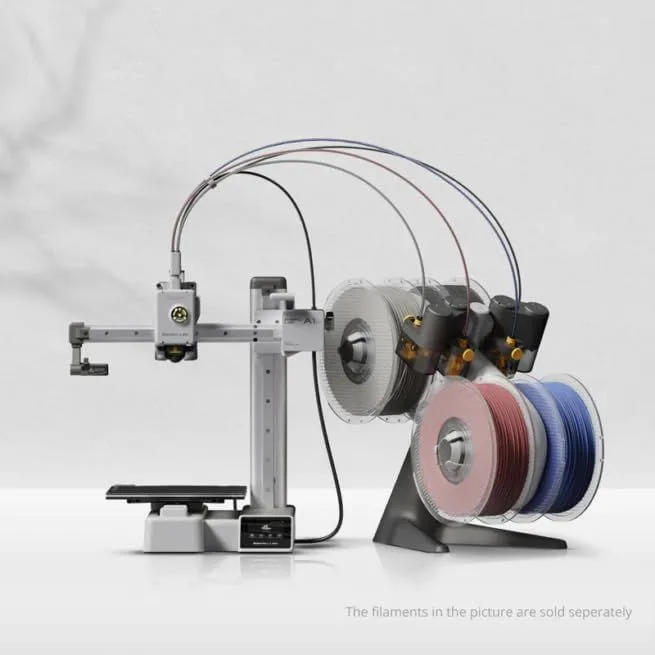
The A1 Mini is the best entry point in 3D printing. At $199, it delivers full auto-calibration, 500mm/s print speed, 48dB whisper-quiet operation, and AMS Lite multi-color capability at $299 total. It prints a Benchy in 14 minutes. The 180mm cube build volume is the only real limitation — and for the models beginners typically print (phone cases, figurines, desk organizers, Benchys), it is enough. The 8,400 reviews at 4.7 stars reflect a machine that converted thousands of fence-sitters into active makers. For the full picture, read our A1 Mini review.
Bambu Lab P2S
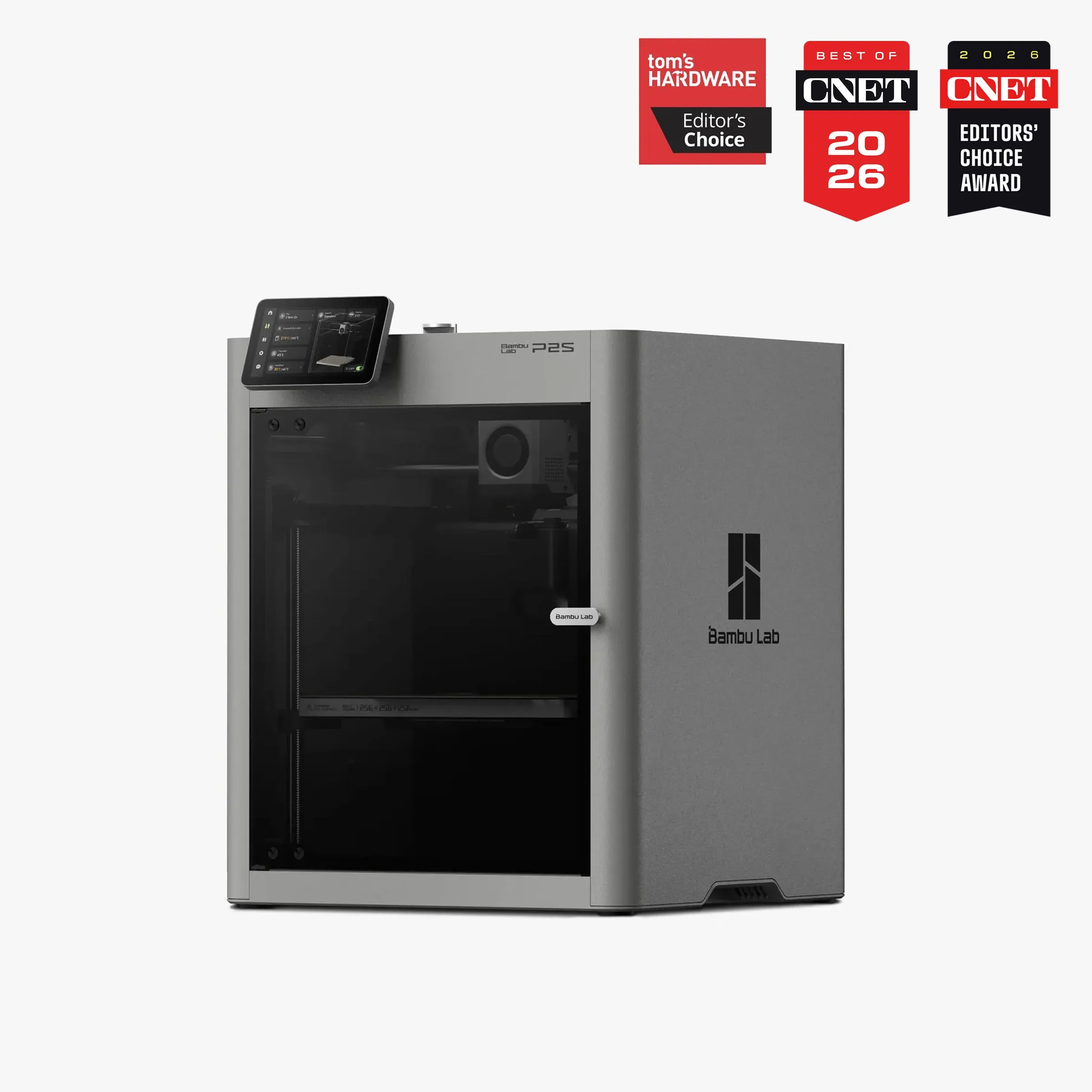
The P2S is the A1 Mini's upgrade path. CoreXY motion doubles real-world throughput. The enclosed chamber unlocks ABS, ASA, and nylon. DynaSense servo extruder eliminates filament grinding. AI clog detection catches overnight failures. The 256mm cube build volume fits models that the 180mm A1 Mini cannot physically print. The 5-inch touchscreen replaces the phone-app-only workflow. At $549, it costs $350 more — and every dollar of that premium translates into a specific capability the A1 Mini lacks. Full analysis in the P2S review.
00_ SPEC_COMPARISON
[ SAME_ECOSYSTEM_TIER_JUMP ]
| PARAMETER | A1_MINI | P2S |
|---|---|---|
| PRINT_SPEED | 500mm/s maxdrag_handle | 500mm/s maxdrag_handle |
| BUILD_VOLUME | 180 × 180 × 180mm | 256 × 256 × 256mmcheck_circle |
| MOTION_SYSTEM | FDM, bed-slinger | FDM, CoreXYcheck_circle |
| EXTRUDER | All-metal 300°C direct drive | DynaSense PMSM servo, 300°Ccheck_circle |
| AUTO_LEVELING | Full auto-calibration (Z-offset, vibration, nozzle pressure)drag_handle | Full auto-calibrationdrag_handle |
| ENCLOSURE | Open frame | Fully enclosed, adaptive airflowcheck_circle |
| DISPLAY | No touchscreen | 5" touchscreencheck_circle |
| NOISE_LEVEL | 48dBcheck_circle | ~49dB |
1
A1 MINI WINS
5
P2S WINS
2
TIED
01_
BUILD VOLUME REALITY CHECK
180mm versus 256mm. The P2S build volume is 2.87 times larger than the A1 Mini by cubic capacity. That's the spec. The question is whether the larger volume matters for what you actually print.
The A1 Mini at 180mm handles: phone cases (130×70mm), most desk organizers, standard figurines and Benchys, keychains, replacement hardware parts, and anything from Printables or MakerWorld tagged "A1 Mini compatible." The community has designed thousands of models specifically optimized for 180mm beds. For the first 3-6 months of 3D printing, the A1 Mini bed is big enough for 80-90% of the models a beginner encounters.
The P2S at 256mm unlocks: cosplay props (helmets, armor pieces), large-scale figurines, functional enclosures for electronics projects, drone frames, full-size vases, and multi-part assemblies that benefit from fewer joins. It also eliminates the frustrating experience of downloading an interesting STL file, loading it into the slicer, and discovering it's 5mm too large for your bed. That frustration grows over time — the more models you want to print, the more often the 180mm limit bites.
The A1 Mini's small bed has a hidden advantage: faster warm-up time. The heated bed reaches target temperature in under 2 minutes versus 3-4 minutes for the P2S larger plate. On PLA (which uses low bed temperatures), the difference is negligible. On PETG at 80°C bed temperature, the warm-up gap adds up across dozens of prints per week. The smaller bed also means less thermal mass to maintain, using slightly less electricity per print hour — a marginal difference, but a real one for users who track operational costs. The compact footprint also matters for desk space. The A1 Mini occupies roughly 350×350mm of desk space including the spool holder. The P2S needs approximately 400×450mm with its larger enclosure and side-mounted AMS. In a shared workspace or dorm room, the A1 Mini fits on half a desk. The P2S demands its own shelf or dedicated printing station.
A1_MINI: 180mm³
- → 5,832 cm³ print volume
- → Phone cases, figurines, hardware
- → Faster bed warm-up
- → Thousands of optimized models
P2S: 256mm³
- → 16,777 cm³ print volume (2.87x)
- → Cosplay, enclosures, large models
- → Fewer multi-part assemblies needed
- → Fits virtually all community STL files
02_
SAME SPEED, DIFFERENT PHYSICS
Both claim 500mm/s. Both achieve substantially less on real models. But the way they achieve those speeds is fundamentally different — and that difference shows up in print quality at high velocities.
The A1 Mini is a bed-slinger: the bed moves in Y, the head moves in X. The bed has mass. Bed-slinger physics limits how fast the bed can change direction without visible ringing artifacts on the printed surface. The A1 Mini's Input Shaper firmware compensates well — the ringing is minimal at standard speeds — but the bed mass creates a hard ceiling on acceleration. At 10,000mm/s², the A1 Mini accelerates at half the rate of the P2S. On geometry with frequent directional changes (infill patterns, thin-walled features, text engravings), the A1 Mini completes prints 25-40% slower than the P2S on identical models.
The P2S uses CoreXY: the print head moves in both X and Y while the bed only moves in Z. The lightweight head can sustain 20,000mm/s² acceleration — double the A1 Mini. On a standard Benchy, the A1 Mini finishes in approximately 14 minutes and the P2S finishes in approximately 12 minutes. On a complex model with thousands of direction reversals, the gap widens to 30-40%. For users printing 1-2 objects per week, the speed difference is invisible. For users printing daily, the throughput advantage of CoreXY compounds into hours saved per month.
One area where the A1 Mini holds its own: the 48dB noise floor is lower than the P2S at approximately 49dB. The A1 Mini is the quietest printer Bambu makes. For users printing in shared spaces — dorm rooms, living rooms, open offices — the A1 Mini's acoustic performance is a genuine advantage over the P2S. The enclosed P2S contains more vibration, but the CoreXY motor activity at high acceleration generates slightly more mechanical noise than the A1 Mini's simpler bed-slinger motion. For late-night printing in a one-bedroom apartment, the A1 Mini wins on noise.
REAL_AVG_SPEED
REAL_AVG_SPEED
03_
OPEN AIR VS ENCLOSED CHAMBER
The A1 Mini is open-frame. PLA, PETG, TPU, and PVA print without issues. ABS and ASA are not recommended — the open frame cannot maintain the stable chamber temperature these materials require. Nylon is technically possible but impractical without an enclosure. For beginners, the material limitation rarely matters: PLA handles 95% of first-year printing needs, and PETG covers the remaining 5% when a part needs water resistance or higher temperature tolerance.
The P2S is fully enclosed with adaptive airflow. It prints everything the A1 Mini handles plus ABS, ASA, nylon, and specialty engineering filaments. The enclosure also contains fumes — important for ABS, which releases styrene vapor during printing. For apartment use, the enclosed P2S is safer for extended prints in poorly ventilated rooms. The adaptive airflow system manages chamber temperature dynamically, preventing the heat creep that plagued the P1S during enclosed PLA sessions in warm environments.
The DynaSense servo extruder is the P2S's second structural advantage. The A1 Mini uses a standard all-metal direct drive — functional, reliable, and adequate for standard filaments. The DynaSense measures filament resistance in real time and adjusts push force before grinding occurs. For TPU at 85A shore hardness (soft flexible filament), the DynaSense feeds reliably at 60-80mm/s while the A1 Mini's extruder needs slower speeds (30-40mm/s) to avoid buckling. For PLA and PETG, both extruders perform identically — the DynaSense advantage only surfaces with challenging materials or at high speeds.
The AI clog detection on the P2S is a feature the A1 Mini cannot replicate. The 1080p camera monitors print progress and detects spaghetti failures, nozzle blobs, and purge chute jams in real time. For overnight prints, this is material insurance — a failed 8-hour print wastes roughly $4-8 of filament and the entire night's machine time. The A1 Mini will happily complete a failed print without noticing. For users who start prints before bed, the P2S AI camera prevents waste that the A1 Mini cannot detect. For Creality's approach to the same problem, see the K1C review.
Look, the touchscreen gap matters more than it sounds. The A1 Mini has no built-in display — you control it entirely through Bambu Studio on a computer or the Bambu Handy phone app. For users who keep a laptop next to their printer, this works fine. For users who want to walk up to the printer and start a job from an SD card or check progress without pulling out their phone, the P2S 5-inch touchscreen changes the daily workflow. It shows real-time print progress, camera feed, temperature readings, and filament status at a glance. The touchscreen is not a luxury — it's the difference between a desktop appliance and a peripheral that requires another device to operate.
04_
THE BAMBU UPGRADE LADDER
Bambu Lab has built a product lineup that functions as an upgrade ladder: A1 Mini ($199) → A1 ($399) → P2S ($549) → X1 Carbon ($1,199). The question most buyers face is not "which is better" — the P2S is objectively more capable — but "where do I enter the ladder?"
Starting with the A1 Mini is the conservative play. At $199, the downside risk is minimal. If 3D printing clicks with you — if you find yourself designing custom parts, printing gifts, selling on Etsy, or obsessively browsing Printables at 2am — you'll outgrow the 180mm bed within 6-12 months and upgrade to the P2S or X1 Carbon. The A1 Mini becomes your dedicated small-parts printer or your travel printer. Bambu's ecosystem means your slicer profiles, cloud history, and multi-printer management all carry forward. The A1 Mini retains value in a multi-printer setup rather than becoming obsolete.
Starting with the P2S is the commitment play. You spend $350 more upfront and skip the growing-pains phase entirely. No "I wish my bed was bigger." No "I wish I had an enclosure for this ASA print." No "I wish the AI camera had caught that overnight spaghetti disaster." The P2S handles everything a hobbyist needs for 2-3 years before the X1 Carbon (with LIDAR and hardened steel nozzle) becomes tempting for carbon fiber or production-volume printing.
The awkward middle is the A1 at $399. It has the P2S build volume (256mm) but no enclosure, no servo extruder, no AI camera, and no touchscreen. At $150 less than the P2S, the A1 saves money on features that matter daily. Unless you specifically need the full-size bed without an enclosure — and that's a narrow use case — the A1 Mini at $199 or the P2S at $549 are the sharper choices on the Bambu lineup. Read the A1 review for the complete analysis.
05_
MULTI-COLOR ECONOMICS
Multi-color printing is the feature that gets people excited about 3D printing in 2026. Both machines support it — but at radically different price points and capability tiers.
The A1 Mini with AMS Lite runs $299 total for 4-color printing. The AMS Lite is Bambu's entry-level multi-material unit: 4 filament slots, manual humidity indicator, and a simpler feeding mechanism than the full AMS. It works. Colors are clean. Transitions produce a small purge tower that wastes approximately 3-5 grams of filament per color change. For printing multicolor figurines, nameplates, and decorative objects on a 180mm bed, the AMS Lite delivers results that looked like science fiction two years ago at this price.
The P2S with AMS 2 Pro runs $799 for 4 colors (expandable to 16 with additional AMS units). The AMS 2 Pro adds integrated filament drying — a heated chamber that keeps filament dry during printing. This matters for PETG, nylon, and TPU, which absorb moisture from ambient air and produce bubbling, stringing, and weak layer adhesion when printed wet. PLA is less affected but still benefits from dry storage. The AMS 2 Pro also has improved feeding reliability and RFID filament detection that auto-loads print profiles — eliminating the manual profile selection step that trips up beginners.
Here's the thing about the price gap: $299 for entry-level multi-color versus $799 for mid-range multi-color. That $500 difference is meaningful for hobbyists. If multi-color printing is your primary motivation — you saw someone print a multicolor lithophane or a full-color Pikachu on Reddit and now you need that capability — the A1 Mini with AMS Lite is the most cost-effective entry. Start there. The purge waste is manageable, the 4-color limit covers most designs, and the 180mm bed handles the majority of decorative multi-color models. Upgrade to the P2S Combo when the bed size limits you or when hygroscopic materials demand the AMS 2 Pro's built-in dryer.
The A1 Mini with AMS Lite at $299 costs less than the P2S standalone at $549. For $250 less, you get 4-color multi-material printing — the capability that most excites new makers. The P2S Combo with AMS 2 Pro costs $799 for up to 16 colors with integrated filament drying. The price gap between entry-level multi-color ($299) and mid-range multi-color ($799) is $500 — nearly the cost of the P2S itself. If multi-color is your primary motivation, the A1 Mini with AMS Lite is the most cost-effective way to start. Upgrade to the P2S Combo later when your ambitions outgrow the 180mm bed.
WHO SHOULD BUY WHICH
BUY THE A1 MINI
You're new to 3D printing and want to test the waters without a large financial commitment. You print PLA and PETG exclusively — which covers every beginner project from Benchys to phone cases to replacement parts. Your models fit within 180mm on every axis. You value quiet operation for shared living spaces. You want the fastest path from unboxing to completed first print — the A1 Mini achieves this in under 20 minutes. Add the AMS Lite for $100 more if multi-color excites you. At $199 standalone, the risk of "I bought a 3D printer and never used it" is minimal.
- $199 — LOWEST BAMBU ENTRY
- 48DB WHISPER-QUIET
- 14-MIN BENCHY
- AMS LITE MULTI-COLOR ($299 COMBO)
BUY THE P2S
You know you'll print regularly and want to skip the "I wish my printer could do this" phase. You need models larger than 180mm. You want ABS, ASA, or nylon capability on day one without buying an aftermarket enclosure. You print overnight and need AI failure detection to prevent wasted filament and time. You want a 5-inch touchscreen instead of phone-app-only workflow. The P2S is the A1 Mini's upgrade destination — buying it first saves the $199 A1 Mini purchase and the time waiting to outgrow it. The P2S vs MK4S comparison covers how it stacks up outside the Bambu ecosystem.
- DYNASENSE SERVO + AI CAMERA
- 256MM ENCLOSED COREXY
- ABS / ASA / NYLON FROM DAY ONE
- AMS 2 PRO UP TO 16 COLORS
Not on Amazon US — Bambu Lab Store / Best Buy / Micro Center
BUYER_QUERIES
What is the difference between Bambu A1 and A1 mini? expand_more
Is the A1 or A1 mini better? expand_more
Is the Bambu Lab P2S worth it? expand_more
What are the main benefits of the A1 mini? expand_more
How much does it cost to run a 3D printer for 1 hour? expand_more
A1 Mini data: 8,400 reviews, 4.7-star average across Amazon and Google Shopping. P2S data: 5,600 reviews, 4.8-star average across Google Shopping and direct-purchase channels. Cross-referenced with Bambu ecosystem data (A1 at 3,200 reviews, P1S at 12,000 reviews for lineage context). Speed benchmarks from community testing data and manufacturer specifications. We do not fabricate hands-on testing claims — we synthesize the largest independent review dataset available for both products.
