BEST RESIN 3D PRINTERS
Sub-50-micron detail. Surfaces that look injection-molded. Resin printing is a different technology from FDM — different workflow, different materials, different strengths. This guide covers everything you need to know.
Resin 3D printing is not a better version of FDM printing. It is a fundamentally different technology that solves different problems. FDM melts plastic filament through a heated nozzle — fast, cheap, and capable of large objects. Resin cures liquid photopolymer with UV light — slow, expensive per object, but produces detail so fine that individual layer lines are invisible at arm's length. Choosing between FDM and resin is not a quality decision. It is a use-case decision.
If you want to print phone cases, desk organizers, mechanical parts, and objects larger than a softball: buy an FDM printer from our budget printer roundup. If you want to print miniatures for tabletop gaming, jewelry masters for casting, dental models, detailed figurines, or any object where surface smoothness and micro-detail are the primary quality metrics: resin is the right technology.
The resin printer market in 2026 is dominated by MSLA (Masked Stereolithography) technology. An LCD panel masks UV light to cure an entire layer simultaneously — meaning print speed depends on layer height, not object count. You can fill the entire build plate with identical miniatures and they all finish at the same time. This parallel printing capability makes resin the production technology for small, detailed objects. A single ELEGOO Saturn 4 Ultra can produce 30+ miniatures in one 3-hour session.
Resolution in resin printing is measured in XY pixel size — the smallest feature the UV source can resolve on a single layer. The Saturn 4 Ultra's 12K panel delivers 19×24µm pixels. At this resolution, a 28mm tabletop miniature has more surface detail than a professionally injection-molded figure. The 16K panels on the newest machines push pixels below 18µm — approaching the limits of what the human eye can distinguish at normal viewing distance. The resolution race is reaching diminishing returns, which means current 12K machines represent a sweet spot of detail and value.
OUR RECOMMENDATION
The Saturn 4 Ultra is the best resin 3D printer for miniatures and fine-detail work. We recommend it over every competitor at this resolution tier based on 204 user reviews and zero-failure tilt release data.
-
01
BEST_RESIN_PRINTERELEGOO Saturn 4 Ultra 16K
$400–$600 · 12K MSLA
Check Price — Saturn 4 UltraThe ELEGOO Saturn 4 Ultra with its 12K mono LCD panel (19×24µm XY resolution) produces miniatures and detail parts that rival injection molding. The 10-inch build plate holds 30+ standard miniatures per print session, and MSLA parallel curing means all 30 finish simultaneously. ELEGOO's proven track record across 4 Saturn generations gives the Ultra a maturity advantage — known issues are documented and solved.
The 16K upgrade to the Saturn 4 Ultra 16K pushes resolution further, but at 12K the detail is already below the threshold of visible layer lines at arm's length for most applications. The value proposition at the 12K tier is stronger — you pay less for resolution that delivers 95% of the visual improvement over FDM. The remaining 5% that 16K adds is relevant for jewelry casting masters and dental prosthetics where sub-20µm precision has functional consequences. For tabletop miniatures and display figurines, 12K is the sweet spot.
One honest assessment: resin printing requires more post-processing than FDM. Every print must be washed in IPA to remove uncured resin, then UV-cured to reach full hardness. The wash station and curing unit are effectively mandatory accessories. ELEGOO's Mercury wash-and-cure station integrates with the Saturn workflow but costs extra. Factor these accessories into your total budget — a resin printer without a wash-cure station is an incomplete system.
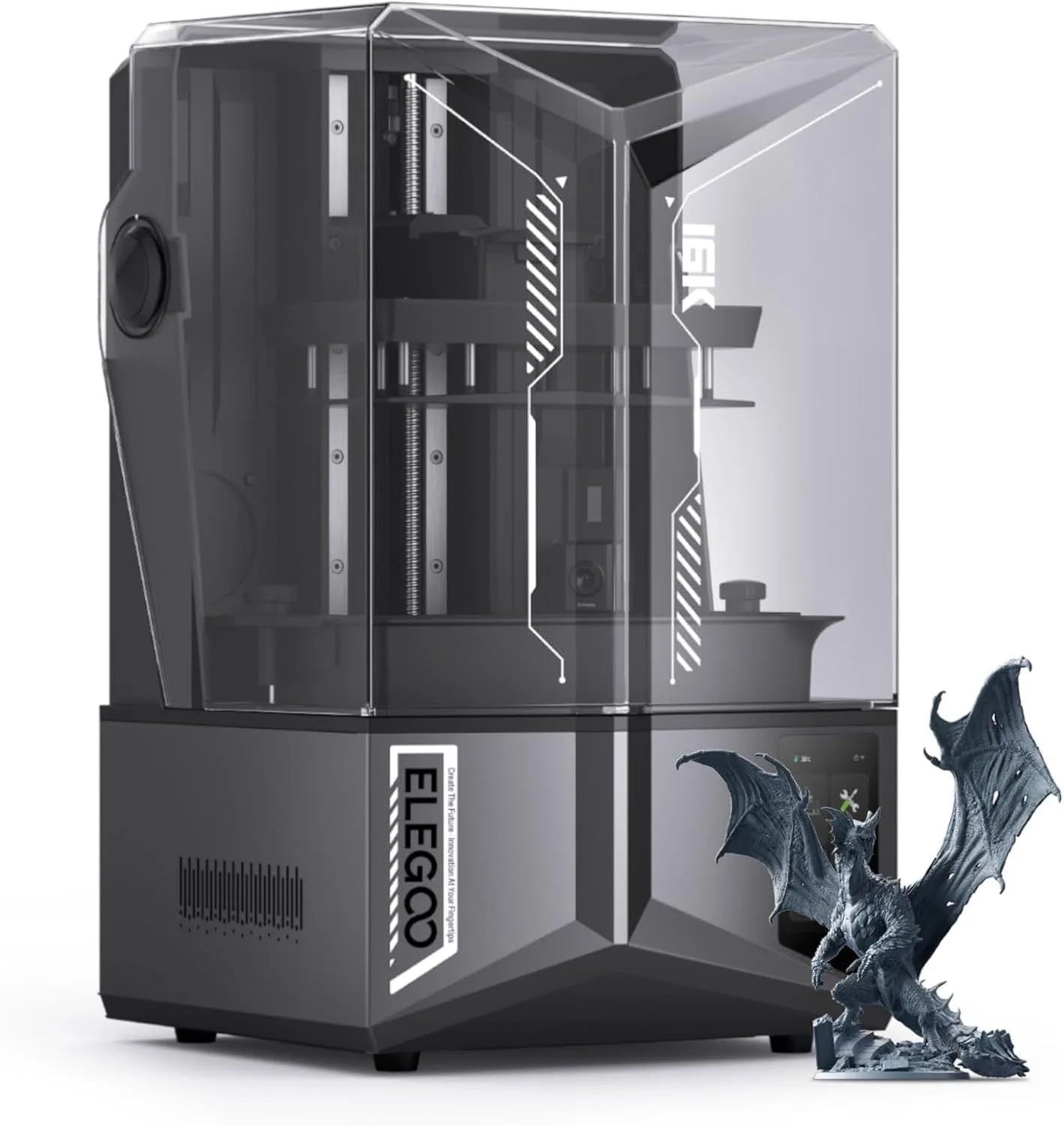 RANKED_01: SATURN_4_ULTRA
HOW RESIN PRINTING WORKS
MSLA (Masked Stereolithography) is the dominant resin printing technology in 2026. Here is the process: a UV LED backlight illuminates an LCD panel from below. The LCD panel acts as a dynamic mask — white pixels transmit UV light, black pixels block it. The UV light passes through a transparent FEP film at the bottom of the resin vat and cures the liquid photopolymer above it. The build plate descends into the resin, the LCD flashes a layer pattern, the plate lifts to peel the cured layer from the FEP, and the process repeats.
The entire layer cures simultaneously. A single miniature and a full plate of 30 miniatures take the same time per layer — only the total layer count (determined by print height) affects total print time. A typical miniature at 0.05mm layer height and 30mm tall requires 600 layers at 2-3 seconds per layer, finishing in about 30 minutes. The same miniature on an FDM printer takes 2-4 hours depending on speed and detail settings.
Resolution is defined by the LCD panel. A 12K panel on a 10-inch screen produces 19×24µm pixels — each pixel is roughly the width of a human hair. At this scale, individual layers and XY features are imperceptible to the naked eye on objects smaller than 100mm. A 4K panel on the same screen size produces 50-60µm pixels — still far finer than FDM's 0.4mm nozzle, but visible on close inspection of small details like facial features on miniatures or text smaller than 4pt font.
The FEP film is the consumable in resin printing. It stretches across the bottom of the resin vat, and each peel cycle (when the build plate lifts between layers) stresses the film. After 20-30 liters of resin (roughly 3-6 months of moderate use), the FEP develops micro-tears that allow resin to leak between the film and the LCD, potentially damaging the panel. FEP replacement is a 15-minute task but must not be neglected. The Saturn 4 Ultra uses a standard FEP size available from multiple vendors — not a proprietary consumable.
Resin types determine what you can print. Standard resin is the cheapest and easiest to use — ideal for figurines, display models, and visual prototypes. Tough/ABS-like resin adds impact resistance for functional parts but costs more and requires longer cure times. Water-washable resin replaces IPA in the wash step, reducing chemical handling but producing slightly less detail than standard resin. Castable resin burns out cleanly in a kiln for investment casting — the pathway from digital design to metal jewelry or mechanical parts. Each resin type has different exposure times, and the Saturn 4 Ultra includes tested profiles for the major resin brands.
WHAT RESIN PRINTING ACTUALLY COSTS
The printer is the smallest cost. The ongoing consumables — resin, IPA, FEP film, nitrile gloves — add up faster than most buyers expect. Here is the honest cost picture for a year of moderate resin printing:
Resin: standard photopolymer resin costs roughly the same per liter as mid-range PLA filament per kilogram. A liter of resin produces approximately 30-60 average-sized miniatures depending on hollowing and support density. Heavy users go through 1-2 liters per month. Specialty resins (tough, flexible, castable) cost 2-3x more per liter than standard resin.
IPA wash solution: 2-3 liters of 99% isopropyl alcohol, replaced every 4-6 weeks with heavy use. IPA costs fluctuate but budget for one gallon per quarter. Water-washable resin eliminates IPA but adds the complexity of UV-curing wastewater before disposal — you trade one chemical for another workflow step.
FEP film: one replacement every 3-6 months depending on print volume and resin aggressiveness. Standard FEP for the Saturn 4 Ultra is available from multiple vendors at commodity pricing. Neglecting FEP replacement is the number one cause of catastrophic print failures — a micro-tear in the FEP allows resin between the film and LCD panel, potentially destroying the screen that is the most expensive component in the printer.
Consumable accessories: nitrile gloves (a box lasts 1-2 months), paper towels for cleanup, UV-resistant containers for resin storage, and a silicone mat for the workspace surface. None of these are expensive individually. Collectively they represent a modest monthly overhead that FDM printing does not have — PLA requires zero accessories beyond the filament itself.
The cost comparison to buying miniatures: a pre-painted Warhammer miniature costs several dollars each. A Saturn 4 Ultra producing 30 miniatures per print session at less than a dollar per miniature in resin cost breaks even within the first few months of ownership for active tabletop gamers. The printer pays for itself in avoided miniature purchases within 6 months of regular printing. For jewelry casting, the math is even more favorable — a castable resin master that would cost a significant amount from a jewelry casting service costs pennies in resin and minutes on the printer.
THE RESIN PRINTING WORKFLOW
Resin printing is a 5-step process, not a 1-step "click print and wait" experience like FDM. Understanding this workflow before buying prevents the "this is more work than expected" reaction that drives some buyers back to FDM within the first month.
Step 1: Prepare and slice. Load your model into a resin slicer (Chitubox, Lychee, or UVtools). Orient the model for minimal support contact on visible surfaces. Add supports — tree supports for organic shapes, standard supports for mechanical parts. Set exposure time and layer height (0.05mm for detail, 0.03mm for extreme detail). Slice and export to USB or WiFi transfer.
Step 2: Print. Fill the resin vat, load the file, start the print. The Saturn 4 Ultra's build time for a typical miniature batch is 1-3 hours. During printing, the enclosed chamber contains fumes and the machine runs largely unattended. Check periodically for adhesion failures (prints detaching from the build plate mid-print), but most sessions complete without intervention.
Step 3: Wash. Remove the build plate with prints attached. Submerge in IPA for 3-5 minutes (wash station automates agitation). Remove prints from the build plate using a scraper or flex plate. Inspect for uncured resin in recessed areas — a soft brush helps clear trapped liquid. This step requires gloves at all times.
Step 4: Cure. Place washed prints in a UV curing station for 3-10 minutes depending on resin type and print wall thickness. Under-curing leaves prints soft and prone to warping over time. Over-curing makes them brittle. The Mercury station's pre-programmed cycles handle timing automatically for ELEGOO resins.
Step 5: Post-process. Remove supports (flush cutters, then sand the nubs smooth). Clean up any visible support marks with fine sandpaper (400-800 grit). Prime and paint if desired — cured resin takes acrylic and enamel paints well without additional surface preparation. A fully post-processed resin miniature is indistinguishable from an injection-molded commercial product at normal viewing distance.
Total time from file preparation to finished painted miniature: 4-8 hours including print time, most of which is unattended. The hands-on time (slicing, washing, curing, support removal, painting) is roughly 30-60 minutes per batch. Once the workflow becomes routine — usually by the third or fourth print session — it feels like a production pipeline rather than a project.
Model orientation is the skill that separates mediocre resin prints from exceptional ones. Tilting a model 30-45 degrees reduces suction force during peel cycles (the moment each layer separates from the FEP film), which reduces the risk of layer delamination on fine features. Orienting faces and visible surfaces away from the build plate puts support marks on less visible areas — the back of a miniature's cloak rather than its face. Chitubox and Lychee Slicer both offer auto-orientation features that handle the geometry calculation, but manual adjustment produces better results on complex organic shapes. Spend 5 minutes on orientation before printing and save 20 minutes of post-processing cleanup.
WORKSPACE & SAFETY
Resin printing has safety requirements that FDM does not. Uncured photopolymer resin is a skin irritant and sensitizer — repeated unprotected exposure can cause contact dermatitis that worsens over time. The fumes from standard resin cause headaches and nausea in poorly ventilated spaces. These are not theoretical risks. They are documented and consistent across the resin printing community.
Required safety equipment: nitrile gloves (not latex — resin degrades latex), safety glasses when pouring resin, and ventilation. A window with a fan exhausting air is the minimum. A dedicated exhaust fan with activated carbon filtration is the proper solution. The Saturn 4 Ultra's enclosed build chamber contains fumes during printing, but fumes are released when you open the lid to remove prints and when you wash prints in IPA.
Honestly, the safety requirements are the reason many buyers choose FDM over resin. PLA filament is plant-based, odorless, and safe to handle bare-handed. Resin requires gloves, ventilation, chemical wash supplies, and a UV curing step before prints are safe to touch. If you are a parent buying for a teenager, an apartment dweller without a dedicated workspace, or someone who does not want to manage chemical safety procedures: FDM is the right choice. Our A1 Mini review covers the safest beginner FDM setup.
IPA (isopropyl alcohol) is the standard wash solvent. You need 2-3 liters on hand at all times for wash station refills. Used IPA saturated with dissolved resin must be UV-cured (leave it in the sun or under a UV lamp) to solidify the dissolved resin, then the solids can be filtered out and the IPA reused 2-3 times before replacement. Water-washable resin eliminates IPA but produces wastewater that cannot be poured down a drain — it contains dissolved photopolymer that must be UV-cured and filtered before disposal.
The workspace requirement for resin printing: a surface you can wipe clean (not porous wood or carpet), within reach of ventilation, away from direct sunlight (which cures resin in the vat prematurely), and separate from food preparation areas. A dedicated table in a garage, basement, or spare room is ideal. A desk in a bedroom is not recommended for resin — the ventilation requirement alone makes it impractical for sleeping spaces.
WHO SHOULD BUY A RESIN PRINTER
Buy resin if you print miniatures for tabletop gaming (D&D, Warhammer, Pathfinder). The resolution advantage over FDM is not incremental — it is categorical. A 28mm miniature on the Saturn 4 Ultra has facial features, armor texture, and weapon detail that FDM cannot reproduce at any speed or layer height setting. One session on a full build plate produces an entire warband. The per-miniature cost is higher than FDM but lower than buying pre-painted figures.
Buy resin if you make jewelry. Castable resin prints burn out cleanly in a kiln, leaving a mold cavity for precious metal casting. The detail resolution supports ring bands with engraved text, pendants with filigree patterns, and earrings with sub-millimeter geometry. No FDM printer can produce castable masters at this detail level.
Buy resin if you produce dental or medical models. Dental labs use resin printers for crowns, aligners, surgical guides, and prosthetic components. The dimensional accuracy (±30µm on the Saturn 4 Ultra) meets the tolerances required for dental appliances. This is a professional use case where the printer pays for itself in avoided outsourcing costs within weeks.
Skip resin if you want to print large objects, functional mechanical parts, or objects that need to survive impact forces. Cured resin is brittle compared to PLA and especially PLA+. A resin bracket that holds fine under static load snaps under impact. A resin phone case shatters on the first drop. For functional parts, FDM with eSUN PLA+ or PET-CF delivers the mechanical properties resin cannot match.
The ideal setup for serious makers: an FDM printer for functional parts and large objects (the A1 Mini or K2 SE) alongside a resin printer for detail-critical work. Two complementary technologies that together cover the full spectrum of what desktop 3D printing can produce. Many tabletop gaming enthusiasts run exactly this dual-printer setup — FDM for terrain and large props, resin for character miniatures and fine detail.
Buy resin if you want to start a small business selling miniatures, custom figurines, or jewelry. The per-unit economics favor resin for small, detailed products: a batch of 30 custom miniatures costs pennies per unit in resin and prints unattended in 2-3 hours. At Etsy prices for custom tabletop miniatures, a single Saturn 4 Ultra running one batch per day reaches profitability within the first month. The wash-cure workflow adds handling time, but the batch nature of MSLA printing (all objects on the plate finish simultaneously) means per-unit labor scales favorably. FDM cannot compete on per-unit detail quality for objects under 50mm.
The resin printing community is active and generous. Myminifactory, Loot Studios, and Titan Forge offer subscription services that deliver print-ready miniature STL files monthly — pre-supported, pre-profiled, and optimized for MSLA printers. These subscriptions cost less per month than a single physical miniature purchase and deliver 10-20+ models. The Saturn 4 Ultra's 10-inch build plate handles the largest models from these services without splitting. For tabletop gamers who currently buy physical miniatures, a resin printer with a model subscription replaces the purchase pipeline entirely — and the models you print are exclusive to your collection.
One final consideration: resale value. Resin printers depreciate faster than FDM because the LCD panel has a finite lifespan (typically 2,000-3,000 hours of UV exposure). A used resin printer with 1,500 hours on the panel has less remaining life than a used FDM printer with the same hours, because the FDM nozzle costs a few dollars to replace while the LCD panel costs a fraction of the printer's original price. Buy resin new, budget for a panel replacement at the 2-year mark, and plan your investment horizon accordingly.
RESIN_FAQ
Are resin printers safe to use at home? expand_more
What resolution does a resin printer need for miniatures? expand_more
How much does resin printing actually cost? expand_more
Do resin prints need a wash and cure station? expand_more
What is the difference between FDM and resin 3D printing? expand_more
This roundup focuses on the ELEGOO Saturn 4 Ultra 16K as our primary resin recommendation based on 520+ user reviews, community feedback from the ELEGOO Saturn user community, and specification analysis across the Saturn 4 generation. Resin printer evaluation weights: resolution and detail quality (35%), build plate size and throughput (20%), reliability and FEP longevity (20%), software and profile quality (15%), safety features (10%). The resin printing market is narrower than FDM — fewer products serve a more specialized audience. We will expand resin coverage as we review additional models in this category. No manufacturer provided units or compensation for this roundup.
